Participant
February 13, 2025
Answered

이미지 변환류

  • February 13, 2025
  • 1 reply
  • 192 views

이미지로 변환을 누르면 저장할 폴더에 1-2초정도 이미지 파일이 나왔다가 사라져요


Correct answer creative explorer

@Adept_art8647  I don't see the "Convert to Image" button in Acrobat? You can export the image

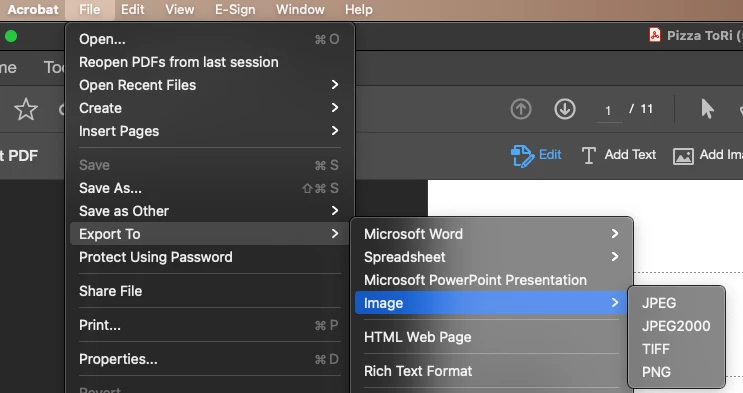
  1. Go to File > Export To > Image.


  2. Choose the desired image format from the options (JPEG, PNG, TIFF).  
  3. Adjust any settings as needed (e.g., resolution, color management).
  4. Select a location to save the image file.
  5. Click Save.

Acrobat will then convert the PDF pages into individual image files in the chosen format.

1 reply

creative explorer
Community Expert
creative explorerCommunity ExpertCorrect answer
Community Expert
March 7, 2025

@Adept_art8647  I don't see the "Convert to Image" button in Acrobat? You can export the image

  1. Go to File > Export To > Image.


  2. Choose the desired image format from the options (JPEG, PNG, TIFF).  
  3. Adjust any settings as needed (e.g., resolution, color management).
  4. Select a location to save the image file.
  5. Click Save.

Acrobat will then convert the PDF pages into individual image files in the chosen format.

m