
2 different radio button groups to affect the same fields
Hello Community,
Im trying to update the code in a form I created a couple of years ago as I know it can be coded more efficiently.
I have 2 sets of radio button groups (Group402.contarcthire & Group404.servicecontract) both with yes/no answers, neither yes/no is set as default but both are required to have an input.
Group402.Contarct Hire "Yes"
Makes Group403 visible & required=true
Automatically makes Group404.servicecontract "Yes" selected which in-turn makes Group407 visible & required=true. If possible Group404.Servicecontract "No" should not be selectable or made hidden?
Group402.Contarct Hire "No"
Group403 is hidden and required=false
Group404 is visible & required=true
Group407 is hidden & required=false (however this will change to visible & required=true if Group404.service contract "Yes" is selected
Group404.Service Contract "Yes"
Makes Group407 visible & required=true (with Contract Hire selected as "No" as noted above)
Group404.Service Contract "No"
Makes Group407 hidden & required=false
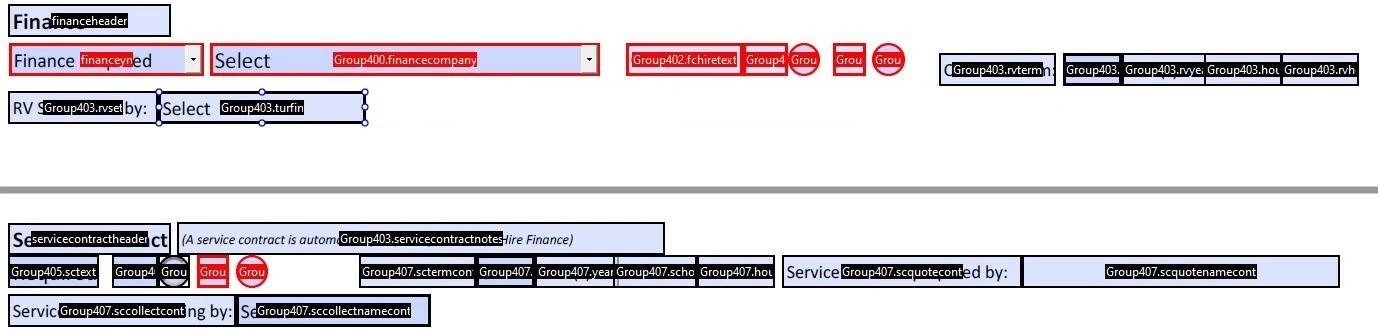
I hope the above all make sense as currently I have multiple copies of the same fields being hidden or made visible depending on the buttons selected and its making the form very clunky to use.
 AdChoices