BartHoeksel
Inspiring
February 26, 2020
Answered

A script to automate setting the destination for a bookmark in Acrobat

  • February 26, 2020
  • 2 replies
  • 4320 views

Hello,


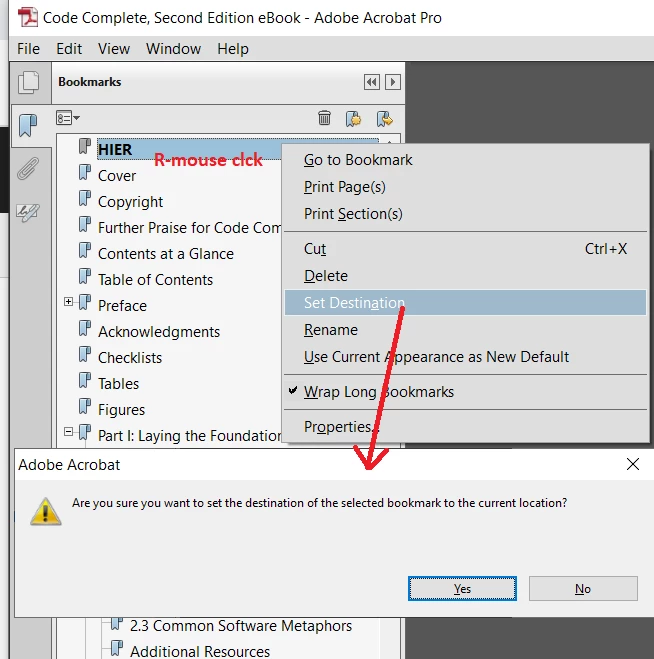
I frequently use a bookmark at the top of the Bookmarks List to store the position I stopped reading the last time I was in the document.


You do that by first making the bookmark (I called it "HIER"), and then right-clicking the bookmark, selecting "Set Destination" what connects the current page with the bookmark.


Is there a way I can automate this or designate this in a script to a button?
 

This topic has been closed for replies.
Correct answer BartHoeksel

[This was a reply I sent to another thread. Don't know why it ended up here...]


Got it... This does the trick:

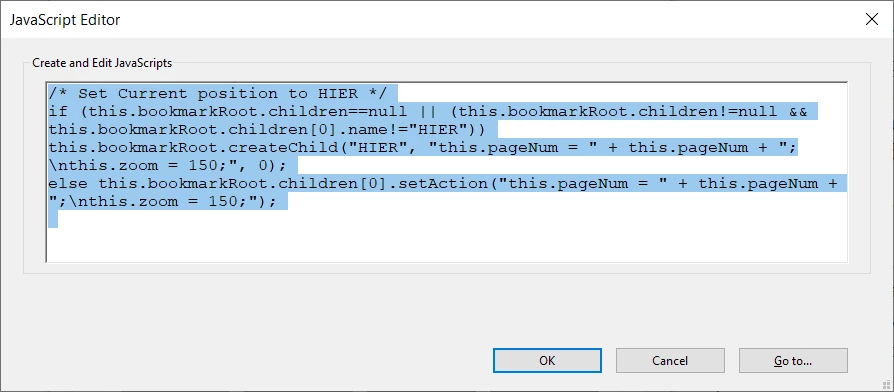
for who wants to try:

/* Set Current position to HIER */
if (this.bookmarkRoot.children==null || (this.bookmarkRoot.children!=null && this.bookmarkRoot.children[0].name!="HIER"))
this.bookmarkRoot.createChild("HIER", "this.pageNum = " + this.pageNum + ";\nthis.zoom = 150;", 0);
else this.bookmarkRoot.children[0].setAction("this.pageNum = " + this.pageNum + ";\nthis.zoom = 150;");

2 replies

Thom Parker
Community Expert
Community Expert
February 27, 2020

You do know that this solution will only work in Acrobat Pro? And just in general it's not a good solution to modify document structure to save something like the current position. 

A more general solution would use either the global object or a form field. Both of which are intended to be modified in Reader. 

Thom Parker - Software Developer at PDFScriptingUse the Acrobat JavaScript Reference early and often
try67
Community Expert
Community Expert
February 26, 2020

A script can only set the action of a bookmark to a script. If you don't mind that then yes, it's possible.

You can achieve it by executing this JavaScript code:


if (this.bookmarkRoot.children==null || (this.bookmarkRoot.children!=null && this.bookmarkRoot.children[0].name!="HIER"))
	this.bookmarkRoot.createChild("HIER", "this.pageNum = " + this.pageNum, 0);
else this.bookmarkRoot.children[0].setAction("this.pageNum = " + this.pageNum);


 The code will edit an existing bookmark, or create it if it doesn't exist.

BartHoeksel
Inspiring
February 26, 2020

OK Try67,


Thank you for your answer.


I have added the script to the bookmark, 

Finished with twice OK.

Now how do I run this script, so the bookmark "HIER" receives the current page as Destiny?

Do I double-click the bookmark? In that case the script changes to:

(forgive me my ignorance, but I've never worked with script in Acrobat before)


try67
Community Expert
Community Expert
February 26, 2020

Sorry, I wasn't clear enough. That script should not go under the bookmark, because it will get overwritten, as you saw.

You could run it from the JS Console, for example, or even from a menu item or toolbar icon (although you'll need to adjust it a bit and place it in a .js file on the local computer).