Legend
January 3, 2026
Answered

AA Pro Fails to Recognize Subscriber

  • January 3, 2026
  • 1 reply
  • 153 views

A point of frustration using AA Pro

Whenever I open a PDF file online it fails to recognize that I am a subscriber. I have to download the file and open it from the desktop.


Is this normal behavior for Acrobat on the web?

Correct answer creative explorer

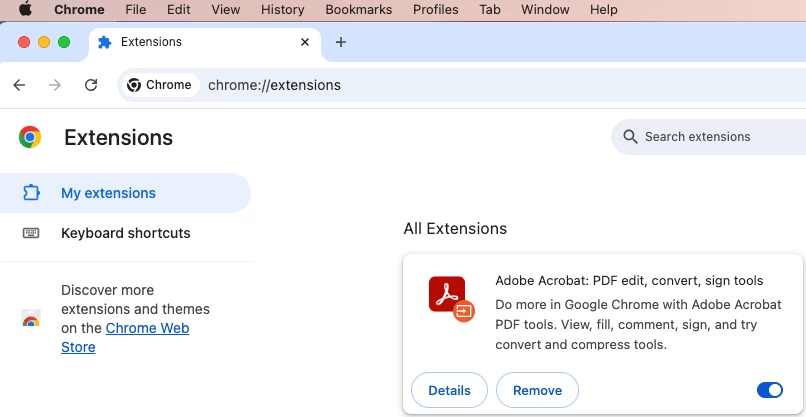
@westdr1dw No, it isn't normal behavior. The likely reason this is happening is because your browser is using its own built-in PDF viewer (Chrome PDF Viewer, Microsoft Edge PDF, etc.) instead of the Adobe Acrobat Extension. Go and download from the web browser xtension store. 

creativeexplorer_0-1767523137381.png

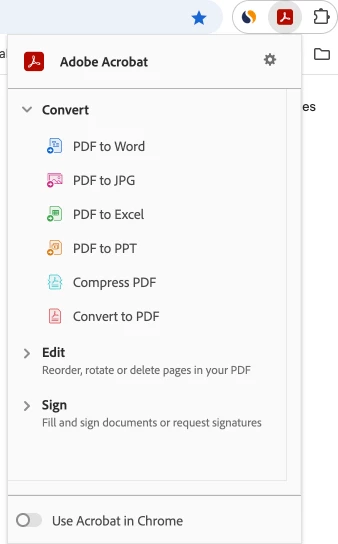
Click on the details to what to tun on automatically or off on details or the gear (settings)

As wll, decide if you want to use in Chrome (in my case!)

creativeexplorer_1-1767523509436.png


1 reply

creative explorer
Community Expert
creative explorerCommunity ExpertCorrect answer
Community Expert
January 4, 2026

@westdr1dw No, it isn't normal behavior. The likely reason this is happening is because your browser is using its own built-in PDF viewer (Chrome PDF Viewer, Microsoft Edge PDF, etc.) instead of the Adobe Acrobat Extension. Go and download from the web browser xtension store. 

creativeexplorer_0-1767523137381.png

Click on the details to what to tun on automatically or off on details or the gear (settings)

As wll, decide if you want to use in Chrome (in my case!)

creativeexplorer_1-1767523509436.png


m
January 5, 2026

Hello!

Yes, that’s normal—when you open PDFs in a browser it uses Adobe’s free online viewer, which doesn’t automatically recognize your Acrobat Pro subscription. Full Pro features only work if you download and open the file in the desktop app, or sign in with your Adobe ID in the browser extension.