
Question
Accessibility Checker flagging elements that aren't in the document.
Whenever I run the accessibility check across several documents the checker returns the same set of issues for Alt Text, Tables, Lists, and Headings.
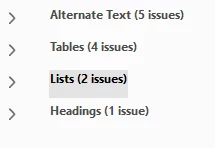
Expanding the arrows doesn't highlight any of these issues in the document, so I don't know where this is coming from. The documents I was reviewing had no images, no tables, and no lists. These were all PDFs of academic articles and book chapters. A colleague in the office next door ran a check on a document generated from R and got the same set of errors. I work with the accessibility checker on a regular basis and I've never had this issue before.
 AdChoices