
_Aaron_9278756
Known Participant
March 22, 2023
Answered

Accessibility: PDF/UA preflight profile error clarification please

  • March 22, 2023
  • 1 reply
  • 964 views

In an effort to achieve PDF/UA, I am running Acrobat Pro's "Verify compliance with PDF/UA-1 (syntax checks only)" test. At this point 3 errors appear. The first I understand.


The second is "Element does not use standard tag." I'm surprised that a web search for the error yields zero Google results!
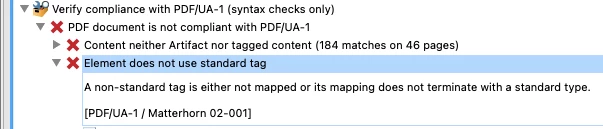
 

Since clicking it does not jump anywhere in my 316-page PDF, can someone advise as to how to resolve this?


And the third error is "More than one THead entry in table." That makes sense, but again, it isn't pointing me to the offending table, though it does show this:

 

Any tips?

This topic has been closed for replies.
Correct answer *Katherine

I was having the same issue as you (and now this question is the only Google result… so it goes) and finally figured it out. I can't quite tell from your screenshot if your problem was the same as mine, but this is what I was seeing:


It turned out the source of the problem was Acrobat itself. I had run my document through the Accessibility Checker first to fix all my alt text and artifact the rest (ie. invisible white boxes and other layout artifacts)—apparently, checking "mark as decorative" in the Accessibility Checker just changes <Figure> tags to <Artifact> rather than actually artifacting those objects. The distinction is that "Artifact" should be an object property; <Artifact> is not a valid structure tag. 


Here's a discussion thread on this: https://community.adobe.com/t5/acrobat-discussions/fixing-decorative-items-creates-lt-artifact-gt-tag/m-p/11399751


Unfortunately at this stage it seems like the only way to correct this is to manually go through the tags panel and right-click -> "Change Tag to Artifact…" on each of those objects, then delete the empty <Artifact> tags. Really sucks if you have a lot of them!!

1 reply

*KatherineCorrect answer
Participant
June 1, 2023

I was having the same issue as you (and now this question is the only Google result… so it goes) and finally figured it out. I can't quite tell from your screenshot if your problem was the same as mine, but this is what I was seeing:


It turned out the source of the problem was Acrobat itself. I had run my document through the Accessibility Checker first to fix all my alt text and artifact the rest (ie. invisible white boxes and other layout artifacts)—apparently, checking "mark as decorative" in the Accessibility Checker just changes <Figure> tags to <Artifact> rather than actually artifacting those objects. The distinction is that "Artifact" should be an object property; <Artifact> is not a valid structure tag. 


Here's a discussion thread on this: https://community.adobe.com/t5/acrobat-discussions/fixing-decorative-items-creates-lt-artifact-gt-tag/m-p/11399751


Unfortunately at this stage it seems like the only way to correct this is to manually go through the tags panel and right-click -> "Change Tag to Artifact…" on each of those objects, then delete the empty <Artifact> tags. Really sucks if you have a lot of them!!

_Aaron_9278756
Known Participant
June 1, 2023

Thanks for clarifying, Katherine! Good to know.
