
Question
Accessible Calendar
I have been tasked with converting a Word document containing the school district calendar to an accessible pdf. Each month has the month and year as H2, followed by a table with calendar for the month. The days are marked with various symbols to indicate events.
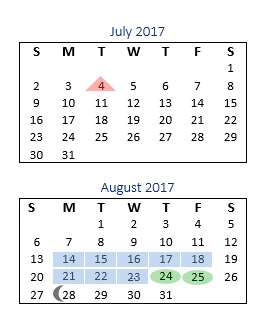
I suspect that someone using a screen reader will not want all those days read aloud, and would prefer to have just the events listed. I also don't think the person cares that a school holiday is marked with a red triangle while a testing day is marked with an orange pentagon.
I have done the following in Word:
- Marked the table header.
- Added alt text and titles to each table to list the important dates.
- Set the alt text on each symbol to "" to tag it as decorative.
As far as I can tell, only the table header was picked up when I converted the document to a pdf.
Here are my questions:
- Is there a way to mark the drawing objects as decorative in Word so that I don't have to do it manually in the pdf?
- Is there a way to have Acrobat pick up the alt text and title from the tables?
- I want the screen reader to omit reading the entire month and just read the alternate text. Which of the following things do I need to do?
- Add the alt text for the entire month to the H2 tag above the table that names the month
- Add the alt text for the entire month to the Table tag.
- Add the alt text individually to the appropriate table data tag.
- Change the Table tag to a Figure tag.
- Remove tags. If so, which ones? (I tried changing the Table tag to a Figure tag and deleting the tags for everything underneath, but that created more accessibility errors.)
Thank you for your help.
 AdChoices