
February 27, 2019
Answered

Accessible Tables

  • February 27, 2019
  • 3 replies
  • 3472 views

I'm green to making pdfs accessible especially tables. I'm trying to help a team in my building create an accessible pdf. They are using a product called hp extreme by open text to convert the data they get into a pdf on demand. Unfortunately they are using tables for layout and there is no way around this. The software is also very limiting. Summaries cannot be added to these tables.  They have sections that have multiple tables but only have one section heading. Is this enough or should all the repeating tables in a section have a heading? Also these tables contain irregular headers that I circled in red.  Should the cells that are irregular headers be put in a <TH> tag?  This is what I have suggested for them to do in the image so far. The image is to help explain the potential final product. The data is sample data.  Any guidance would help.

Thanks,

Angela
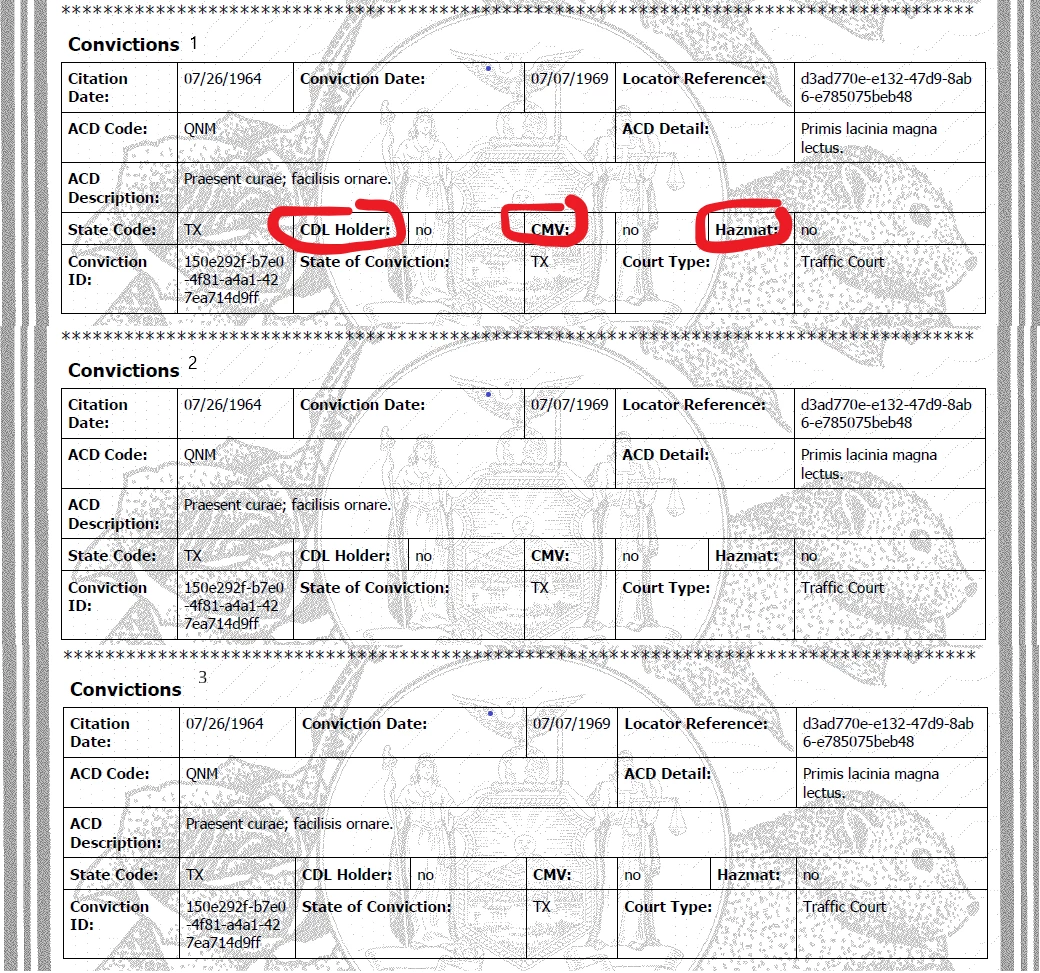
This topic has been closed for replies.
Correct answer hammer0909

With a document like this, I'd literally pull the content out of the table structure in the tags pane and simply organize the information logically so that it's read correctly. You could use heading levels for the captions and paragraphs for the content. Being that this isn't an actual fillable PDF form, it shouldn't be too difficult. Once you've moved the content out of the cells of the table, delete it. This will avoid you trying to remediate an otherwise impossible table and still allow the content to be read correctly while still being compliant.

3 replies

hammer0909
Community Expert
hammer0909Community ExpertCorrect answer
Community Expert
March 5, 2019

With a document like this, I'd literally pull the content out of the table structure in the tags pane and simply organize the information logically so that it's read correctly. You could use heading levels for the captions and paragraphs for the content. Being that this isn't an actual fillable PDF form, it shouldn't be too difficult. Once you've moved the content out of the cells of the table, delete it. This will avoid you trying to remediate an otherwise impossible table and still allow the content to be read correctly while still being compliant.

March 7, 2019

@@Thank you. I did this for them already. With the software they are using it's virtually impossible to replicate. I'm going to pass these suggestions along to them an go from there. Thank you for your help. Bevi Chagnon | PubComyn

Inspiring
February 27, 2019

Could they restructure that? it looks more like a form than a table to me. For example, a 2-column table with header cells as Label for the first column and Value for the second? Or something logical based on whatever this is for.

In this example, the left column would be a list of:

Citation Date

Conviction Date

Locator Reference

etc.

The right column would then list the value of each of those fields.

At the very least, this would give you a proper heading row and a usable structure for read order, IMO.

  • Row 1: Label - Citation Date; Value - xx/xx/xxxx
  • Row 2: Label - Conviction Date; Value - xx/xx/xxxx

Table 1. Conviction 1

Label (whatever)

Value
Citation Datexx/xx/xxxx
Conviction Datexx/xx/xxxx
Locator Referencedata
ACD Codedata

*edit to add table.

March 7, 2019

I believe they are going to try restructuring the tables to be labels and text fields and then go from there. This suggestion helps too! Thank you for the help!

Inspiring
March 7, 2019

Hey, thanks for coming back to update everyone! Much appreciated. Hopefully they will be able to follow your suggestions and find a way through this one.

Good luck

Bevi Chagnon - PubCom.com
Legend
February 27, 2019

Hi Angela,

There is nothing in these samples that is accessible per the standards.

First, there are 3 distinct tables.

Second, there aren't any column or row headers whatsoever, so the use of <TH> tags is inappropriate. And table summaries are the least of the problems!

This clearly demonstrates why tables should not be used for layout: they are nearly impossible to make accessible, and do not allow the humans who use assistive technologies to interact with them and comprehend the data.

Example:

One cell contains the label information Citation Date and another contains the data 07/26/1964.

Two different cells = two different pieces of content. There is no way to relate "Citation Date" with "07/26/1964." How is someone who uses assistive technologies, especially if they are blind and use a screen reader, supposed to know that these 2 cells are connected in some way?

I suggest you find a better way to create and publish your data.

|&nbsp;&nbsp;&nbsp;&nbsp;Bevi Chagnon &nbsp;&nbsp;|&nbsp;&nbsp;Designer, Trainer, &amp; Technologist for Accessible Documents ||&nbsp;&nbsp;&nbsp;&nbsp;PubCom |&nbsp;&nbsp;&nbsp;&nbsp;Classes &amp; Books for Accessible InDesign, PDFs &amp; MS Office |
February 27, 2019

I completely agree with every thing you said and I've tried to tell them this  and unfortunately there is no way around using this software. Is making these tables accessible a lost cause  or  is it doable? Do you have any suggestions?