

Syeds
Inspiring
January 8, 2024
Question

Acessibility > Reading Order Shortcuts

  • January 8, 2024
  • 1 reply
  • 746 views

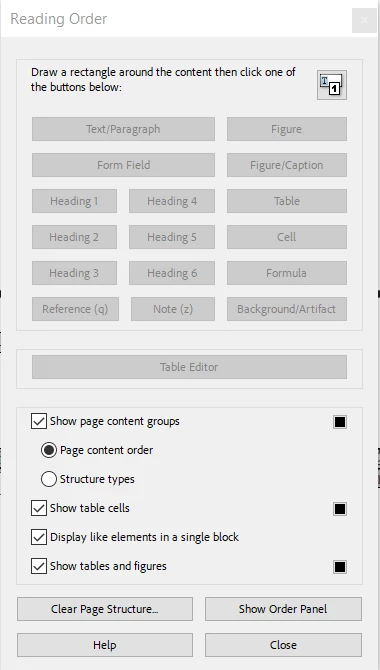
Are there any shortcuts for tagging the reading order? I have mutiple page and detailed documents that 98 percent of the time I am tagging as "text/paragraph". Can I alternatively use keyboard stokes or must I always use my mouse? Thanks.
 

This topic has been closed for replies.

1 reply

Amal.
Community Manager
Community Manager
January 9, 2024

Hi @Syeds


Hope you are doing well and thanks for reaching out.


Please go to All tools section > Prepare for accessibility and Select the file you want to auto-tag and click on 'Automatically tag PDF'


Note: You will still need to look over the tags that Adobe Acrobat Pro DC generates to make sure they are correct, and fix them if they are incorrect. In most cases, especially with larger documents, it is faster to let Adobe Acrobat Pro DC tag the document for you rather than manually tagging the entire document.


Hope this information will help.


~Amal

Syeds
SyedsAuthor
Inspiring
January 9, 2024

@Amal. Thanks. This is a great way to start the tagging process. I am past this step and was only concerned if there were shortcuts specific to the creating/correcting tags with the accessible PDF.