Participant
March 10, 2017
Answered

Acrobat 2015 Want to always show page controls in toolbar — how do I do this?

  • March 10, 2017
  • 2 replies
  • 3879 views

Acrobat 2015 Want to always show page controls in toolbar — how do I do this?

This topic has been closed for replies.
Correct answer Adorobat

Hi RossG,

Try launching Acrobat>click View>Show/Hide>hover your mouse over Page Controls>and select Show Page Controls
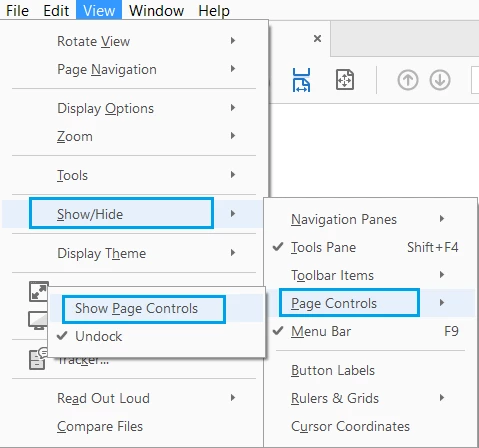
Uncheck the option Undock by clicking on Undock.

Let me know if you have any questions about this.

Thanks,

Shivam

2 replies

Participant
June 20, 2023

The page control toolbar has an icon on it and if you hit the icon it moves it (the page control toobar) from either the screen or to the main toolbar.

Adorobat
AdorobatCorrect answer
Participating Frequently
April 10, 2017

Hi RossG,

Try launching Acrobat>click View>Show/Hide>hover your mouse over Page Controls>and select Show Page Controls

Uncheck the option Undock by clicking on Undock.

Let me know if you have any questions about this.

Thanks,

Shivam

Participant
August 24, 2017

I've done this and every time I open a PDF document, I have to select show page controls. Once selected it does not stay selected when exiting a document and moving on to a new document.

Adorobat
Participating Frequently
September 5, 2017

Hi Kipg,

Try unchecking "Restore last view settings when reopening documents" under Edit > Preferences > Documents, relaunch Acrobat, and see if that helps.

Thanks,

Shivam