Bevi Chagnon - PubCom.com
Legend
August 31, 2023
質問

Acrobat 2023: How to revert to classic GUI user interface

  • August 31, 2023
  • 返信数 39.
  • 158870 ビュー

ADOBE: Do not delete or merge this conversation thread.

This post is to consolidate the information from dozens of other posts about how to revert to the previous user interface in Acrobat.


It consolidates the information users need to know.


When Acrobat is updated to version 2023, it replaces the traditional user interface that's been in place for the past 20+ years with what Adobe is calling the "Modern Viewer," which has some severe technical problems (missing utilities) and a complete relocation of familiar tools, menus, and quick access tool bars.


In Windows Acrobat:

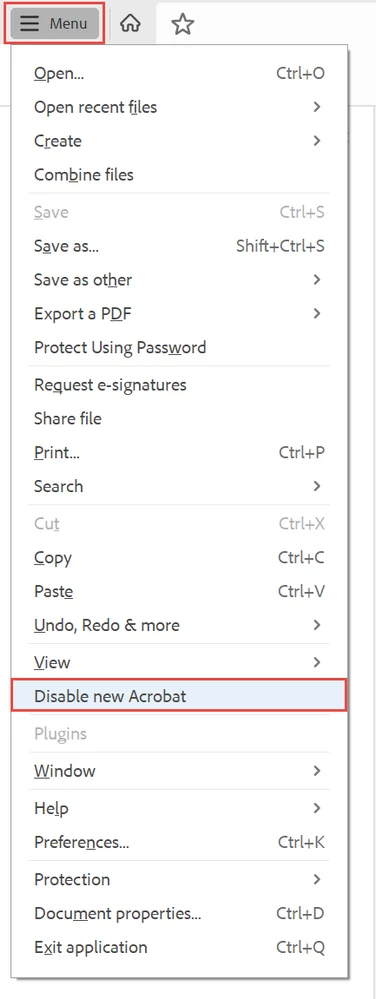
  1. Locate the "hamburger menu" in the upper left corner (3 horizontal bars where the old "File" menu used to be).
  2. Select Disable New Acrobat.

The hamburger menu in new Acrobat-Windows.


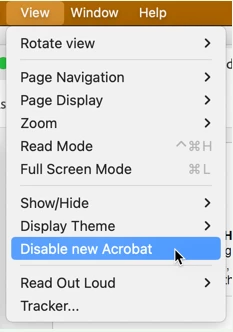
In Mac Acrobat:

  1. From the View menu at the top, select Disable New Acrobat.


Let Adobe know:

You can voice your opinion about the new interface at UserVoice: https://acrobat.uservoice.com/forums/590923-acrobat-for-windows-and-mac/suggestions/47082691-ditch-t... 

Be sure to leave a comment about your opinion and experience with the new interface. They need to hear from us users.


FYI, UserVoice is Adobe's official website where it reads and takes into account suggestions and complaints from users of its various products.  On the other hand, this community forum is a user-to-user help forum and information posted here rarely reaches ears or eyes at Adobe.


Learn about the new interface:

https://helpx.adobe.com/acrobat/using/new-acrobat-experience.html


Hope this post helps you quickly get back to work!


返信数 39

Participant
March 28, 2024

life saver. the tabletification of PC programs has gotten out of hand. stop taking away my file menu bar!

Participant
March 26, 2024

This is driving me nuts, the new interface can't be disabled fast enough.

But the real kicker has been that there are bugs in the new version that have staff clicking multiple times to open a PDF if it opens the PDF at all.


To further stuff it up Creative Cloud doesn't uninstall. 

Bevi Chagnon - PubCom.com
Legend
March 17, 2024

Wish List


Fellow Acrobat users!

I want to turn our complaints into something useful for Adobe's development team, so I wrote up some key fixes to the new interface that will help us get the tools we need while giving Adobe a better interface for Acrobat's future features.


Please take a minute to review my wish list.

And please add your ideas to it!

  • Keep it positive and helpful. (They already know how much we hate it, they got the message.)
  • Suggestions on what you want to see changed or restored.
  • Just address the interface, not what features you want (that's for another post).


And be sure to describe what you use Acrobat for, how it's used for work or your personal computing. It's clear that the Adobe design team may have missed how various industries rely on Acrobat, so here's your chance to let them know what you need in the interface.


I believe it's our last chance to get the Acrobat we need before Adobe carves the new interface into stone.


The wish list is at:

https://acrobat.uservoice.com/forums/590923-acrobat-for-windows-and-mac/suggestions/48153893-new-acrobat-wish-list-for-a-better-interface


Add your "wishes."

And don't forget to click the VOTE button in the upper left.


—Bevi Chagnon

One of the original Acrobat trainers since the original beta version 30+ years ago.

This is not my first time encountering a new Acrobat interface.

And no, I don't work for Adobe.


|    Bevi Chagnon   |  Designer, Trainer, & Technologist for Accessible Documents ||    PubCom |    Classes & Books for Accessible InDesign, PDFs & MS Office |
Inspiring
February 1, 2024

Change, in and of itself, is not necessarily desireable. 

This is a change, but NOT AN IMPROVEMENT!!!!

I hope that the option to use the previous interface.

If someone likes the new interface, fine. 

I find it a rats nest!

krisgilberttufts
Participating Frequently
January 30, 2024

The 'Disable New Acrobat' option worked on my iMac but it does not and will not work on my Windows machine. The new GUI is a complete disaster on Windows. Adding optional functions to the ridiculous little toolbar on the right only lasts as long as its open and then you have to add them all over again the next time its used. Moving that little toolbar to the left reverts back to the right each time the application is opened. Customization has to be done each session. A total failure by Adobe.

Participant
January 30, 2024

Thank you, thank you, thank you for this!! That new version was ruining my days! Waste of some developer's time, really.

Known Participant
January 24, 2024

I don't know how to get this message to Adobe. The new Acrobat Pro just installed on my computer. The new format is terrible. I find that it takes me four times longer to work on a pdf file. The young "whipper snappers" at Adobe should not mess with the layout. (The same thing happened to MS Office many years ago. Lont-time users of that software ensemble are still searching for features that were once easy to find.) Thankfully, Adobe Acrobat users have provided information on how to revert to the classic layout. I hope Adobe decides to do away with the new format.

Participating Frequently
January 25, 2024

I'm so glad I found one of the post how to download Acrobat Pro 2020. That solved so many problems I was having with this newest version. Could not even zoom into a simple file, it would lockup Acrobat. What's really crazy is it was bogging down my whole computer just having it installed. Took me weeks to figure out what was going on. I would get the spinning beach ball constantly for even the smallest task like typing an email. Removed Acrobat and installed 2020 Pro. Problem solved!


The last Pro Acrobat was version 9. Everything else has been a joke since.

Abambo
Community Expert
Community Expert
January 25, 2024

Oh yes, the good old times of the tube monitors…

ABAMBO | Hard- and Software Engineer | Photographer
Participant
January 23, 2024

Is there a way to move or hide the left and right side tool bars?  They are taking up valuable screen space especially on a monitor oriented vertically.

Abambo
Community Expert
Community Expert
January 23, 2024
quote

Is there a way to move or hide the left and right side tool bars?  They are taking up valuable screen space especially on a monitor oriented vertically.


By @Tony34971475l54l

What about this?


ABAMBO | Hard- and Software Engineer | Photographer
Participant
January 22, 2024

THANK YOU!!!!  It is extremely irritating when there is ZERO value add in a change.  

Inspiring
January 11, 2024

I can only find one, good thing about this new update and that is that you've reverted back to how you could batch process reducing file sizes as it was in 9. Why don't you just reintroduce the same UI as that but with updated graphics? There was nothing wrong with the way 9 worked.

Inspiring
January 19, 2024

So, by reverting to the previous GUI it disables the one useful tool that you reintroduced into the latest version from 9 - reducing multiple files (see grab). Why can't that still be included if you switch to the previous iteration of the software? And why rename 'Reduce Files' to 'Compress Files'? You are making absolutely unecessary changes for the sake of it. I'm now stuck with using this latest UI abhorration because I find the option to reduce multiple files like this very useful for my workflow. I also notice that you've kept the same design and style for this action from Acrobat 9 - I think that says it all, don't you? If you can apply tools and UI from the previous version, give us the option to revert back to even earlier versions. I think you'll see what people will most likely want to use. This is either corporate arrogance or corporate ignorance at its very worst.

Abambo
Community Expert
Community Expert
January 19, 2024
quote

So, by reverting to the previous GUI it disables the one useful tool that you reintroduced into the latest version from 9 - reducing multiple files (see grab). Why can't that still be included if you switch to the previous iteration of the software?


By @cyclopsdx

Does this help?

Any new features of the new UI will be disabled, as that is what you asked for, when reverting. That seems normal. But “Reduce File Size” on multiple files does not seem to be part of the new features…

ABAMBO | Hard- and Software Engineer | Photographer