



Acrobat 2023: How to revert to classic GUI user interface
ADOBE: Do not delete or merge this conversation thread.
This post is to consolidate the information from dozens of other posts about how to revert to the previous user interface in Acrobat.
It consolidates the information users need to know.
When Acrobat is updated to version 2023, it replaces the traditional user interface that's been in place for the past 20+ years with what Adobe is calling the "Modern Viewer," which has some severe technical problems (missing utilities) and a complete relocation of familiar tools, menus, and quick access tool bars.
In Windows Acrobat:
- Locate the "hamburger menu" in the upper left corner (3 horizontal bars where the old "File" menu used to be).
- Select Disable New Acrobat.
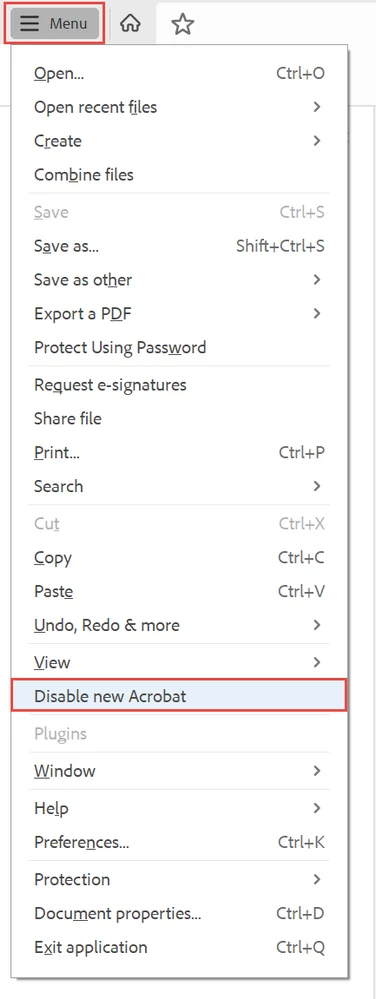
The hamburger menu in new Acrobat-Windows.
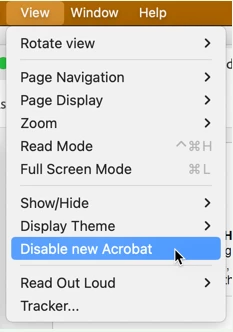
In Mac Acrobat:
- From the View menu at the top, select Disable New Acrobat.
Let Adobe know:
You can voice your opinion about the new interface at UserVoice: https://acrobat.uservoice.com/forums/590923-acrobat-for-windows-and-mac/suggestions/47082691-ditch-t...
Be sure to leave a comment about your opinion and experience with the new interface. They need to hear from us users.
FYI, UserVoice is Adobe's official website where it reads and takes into account suggestions and complaints from users of its various products. On the other hand, this community forum is a user-to-user help forum and information posted here rarely reaches ears or eyes at Adobe.
Learn about the new interface:
https://helpx.adobe.com/acrobat/using/new-acrobat-experience.html
Hope this post helps you quickly get back to work!
 AdChoices