Bevi Chagnon - PubCom.com
Legend
August 31, 2023
Question

Acrobat 2023: How to revert to classic GUI user interface

  • August 31, 2023
  • 39 replies
  • 159177 views

ADOBE: Do not delete or merge this conversation thread.

This post is to consolidate the information from dozens of other posts about how to revert to the previous user interface in Acrobat.


It consolidates the information users need to know.


When Acrobat is updated to version 2023, it replaces the traditional user interface that's been in place for the past 20+ years with what Adobe is calling the "Modern Viewer," which has some severe technical problems (missing utilities) and a complete relocation of familiar tools, menus, and quick access tool bars.


In Windows Acrobat:

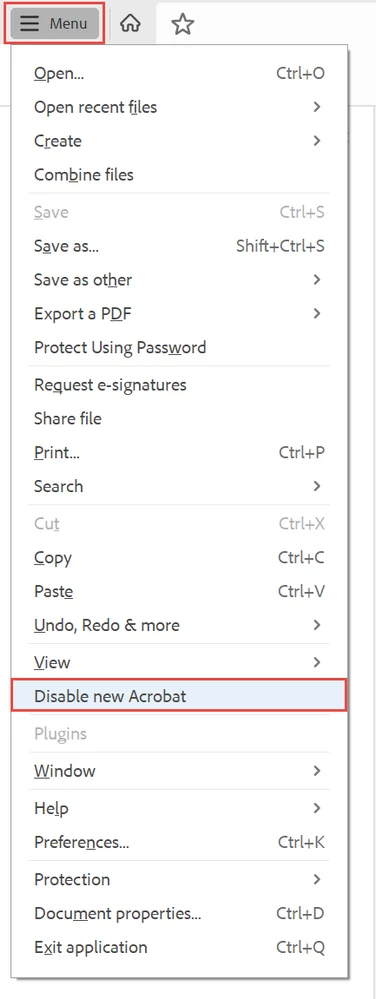
  1. Locate the "hamburger menu" in the upper left corner (3 horizontal bars where the old "File" menu used to be).
  2. Select Disable New Acrobat.

The hamburger menu in new Acrobat-Windows.


In Mac Acrobat:

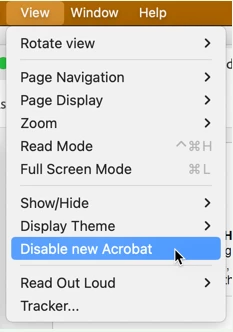
  1. From the View menu at the top, select Disable New Acrobat.


Let Adobe know:

You can voice your opinion about the new interface at UserVoice: https://acrobat.uservoice.com/forums/590923-acrobat-for-windows-and-mac/suggestions/47082691-ditch-t... 

Be sure to leave a comment about your opinion and experience with the new interface. They need to hear from us users.


FYI, UserVoice is Adobe's official website where it reads and takes into account suggestions and complaints from users of its various products.  On the other hand, this community forum is a user-to-user help forum and information posted here rarely reaches ears or eyes at Adobe.


Learn about the new interface:

https://helpx.adobe.com/acrobat/using/new-acrobat-experience.html


Hope this post helps you quickly get back to work!


39 replies

Participant
September 19, 2023

THANK YOU!!! @Bevi Chagnon - PubCom.com  You are a wonderful person.


This may go down in history as one of the worst UI changes ever.  I actually considered the possibility that Adobe wrecked their product on purpose so that users might be compelled to get a paid version in a desperate attempt to make things better.


I've never understood the 'let's move buttons for the sake of moving buttons' mentality.  Absolutely terrible.


LKLAHR
Participant
October 24, 2024

Some of you younger users may not remember...The New Coke?

Participant
September 19, 2023

Hi Bevi, when I try to use the "Disable New Acrobat Reader" button in the menu bar you pointed to, it doesn't work for some reason. It just re-opens in the same new view (which I agree with the many comments posted - it's pretty terrible). I've tried it a dozen times, I've made sure all other programs and documents are closed, I've also restarted my computer, no luck. Do you have any thoughts on what might be going on / how I might be able to get back to the classic view? Thank you for your help!

Participant
September 6, 2023

Restore Menu Bar in Adobe Reader | Swtich from New Adobe Acrobat Reader to Old 
https://youtu.be/zFkjvUxkSS0

Participant
September 5, 2023

THANK YOU! @Bevi Chagnon - PubCom.com  THANK YOU! 
THANK YOU! THANK YOU! THANK YOU! THANK YOU! THANK YOU! THANK YOU! THANK YOU! 
Am I a grateful user?  You bet I am!
You are a god/dess-send!
I wasted more than an hour trying to figure out their newer version and STILL could not customize tools/processes as I had it set up before their UNANNOUNCED, MAJOR CHANGE. It is DISGUSTING what Acrobat did. WTH!  Has caused myself, an independent user, a great deal of stress, upset and worry as to how I would effectively as well as efficiently do my job!!!  I cannot imagine the problems faced by large-scale and major players!!  WHOMEVER WAS INVOLVED WITH THIS HORRIBLE CHANGE SHOULD LOSE THEIR JOBS!! Think of huge impact, the problems, productivity and costs to users the new change has created!  ADOBE NEEDS TO DO AN ALL-OUT EFFORT TO COMMUNICATE TO EVERY SINGLE ONE OF THEIR USERS OFFERING THE OPTION TO KEEP THEIR OLD VERSION. Why should myself and others have to do a google search and finally have come across your saving grace post Bevi!  DO THE RIGHT THING ADOBE AND MAKE THIS RIGHT!!  Have any of you in corporate seen your reviews online??  Not good!  Take not for granted your position in the marketplace. New technologies and competitors are emerging and you may be found in the dust, because of actions like the Adobe Acrobat change.


Participant
September 5, 2023

Right on the mark!

Community Manager
September 5, 2023

Hi All!


Hope you are doing well.


We acknowledge that the new Acrobat represents a notable change; however, we hope that as you get familiar with the new interface, you can be more productive and get more out of Acrobat.


We are actively working on any unavailable features, such as customizing the All Tools positioning or user interface. And we will address them with the highest priority. 


A point to note is that as we made these changes in the interface, we have ensured all tools & features that are currently supported retain their familiar functionalities and workflows as they did in the previous version. We proactively address any gaps or issues users report regarding any break in current workflows.


If your critical workflows are impacted, you can switch to the old UI from the “Menu” on the top left corner of Windows OS and View Menu on MacOS. We will follow up with a detailed community-featured post, guiding you to familiarise yourself with the new interface and regular updates on upcoming changes.


We will follow up on this response with a detailed article explaining the changes, a guide to help familiarise you with the new interface, and regular updates on upcoming changes.


Thank you once again for your feedback, and do look forward to our upcoming releases!


~Tariq

Participant
December 12, 2023

The problem is you forgot to take into account that a considerable number of your users are 45+ and not super-au fait with new technology. We have a business account with you and I have emailed from that to complain about the shortcomings of the new version of Acrobat.

TerabyteNet
Participating Frequently
December 13, 2023

45+? Are you kidding?  The over 45 crowd INVENTED the Internet.  I had a computer on my desk in the late 1970s.  Even my father who is 80 used computers most of his career.  We are quite well prepared to handle new technology.  The problem is the apparent kids Adobe employees to write their code think changes for the sake of change are the right way to encourage loyalty and customer spending.  Adobe pulls this junk all the time.  Let's not blame their poor decisions on the age of users.  Let's put the blame were it squarely belongs, on the apparent 12 year old writing Adobe's code who don't know anything about efficiency or functionality.  They just want it to look new so they can justify their jobs.

Inspiring
September 5, 2023

Hi


I tried to post a comment on the forum noted above, but it would not accept my password, and when I tried to reet my password, the verification email looked remarkably like spam — it had no mention of Adobe and was sent by a server I had never heard of, so I did not follow through. This seems a massive violation of good customer inreface practice — communications from a public-facing website should clearly identify the origination company (NOT the intermediary servicing vendor).

blugrsgrl
Participating Frequently
September 1, 2023

Hello, thanks for being so helpful on this and other threads. I appear to NOT have the "new" Acrobat, however I still cannot get the Click to Zoom, Hand and Select tools to show on the toolbar, even though I have truned everything else "off" under "Show Select and Zoom Tools". Any ideas?

Participant
November 20, 2024

May be they forgot to include in the update. Why dont you use shortcut CTRL+ '+' and CTRL+'-' for zooming in or out instead - till the solution is identified

Participant
September 1, 2023

The new interface adds multiple steps to every click, extremely huge and inefficient decline from previous interface, bordering on unusable.  Thank you Bevi Chagnon for finding this life-saving option to continue using the prior, vastly better interface.

Participant
November 20, 2024

Completely agree .. The new upgrade is actually a downgrade

gary_sc
Community Expert
Community Expert
August 31, 2023

Thanks Bevi