selina.lord
Participant
March 26, 2026
Question

Acrobat 2024 Classic - functionality missing from Outlook PDFMaker portfolios

  • March 26, 2026
  • 2 replies
  • 53 views

I’ve just upgraded from Acrobat Pro 2020 (perpetual licence) to the 3-year 2024/Classic track equivalent on Windows 11. One of my primary uses for Acrobat is compiling portfolios of emails in Outlook 365. Previously in the 2020 version I could export the emails, then open the portfolio and make minor changes (set a horizontal/vertical window split view and add a “To” column to mimic an inbox).


These functions are no longer available in Pro 2024/Classic. An entire right-click context/submenu is missing when the portfolio file is open.


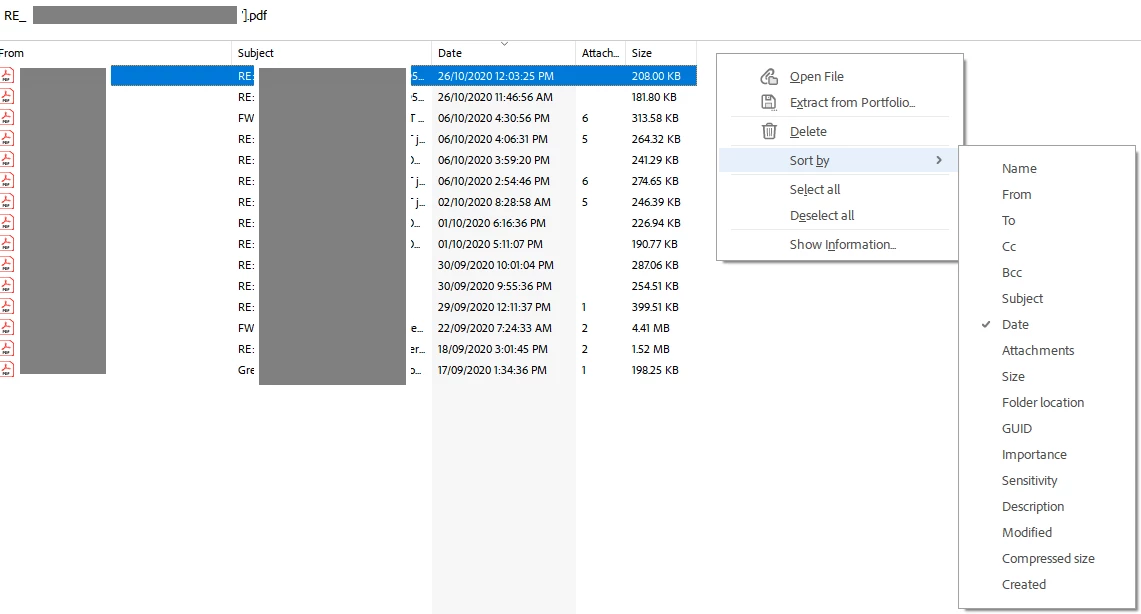
Screenshots below: 1) 2020, showing the availability of the “View” context menu to make changes to columns and the use of a vertical screen split and 2) 2024, showing the lack of this menu.


The lack of functionality is appalling. I also attempted to contact support via the website chat and my query was terminated without ever speaking to anyone. Customer service is nonexistent.


Any assistance would be appreciated as this functionality is critical to my workflow.
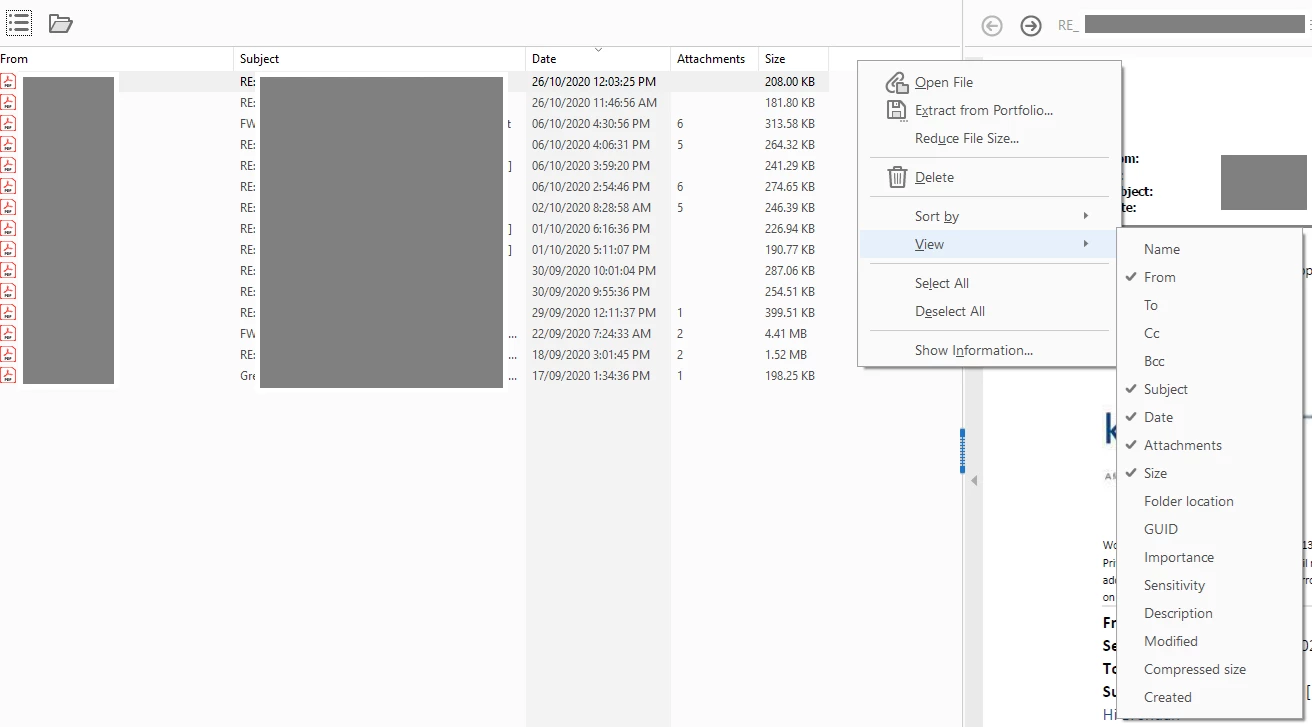
 

Acrobat Pro 2020 - editing an email PDF portfolio created in Outlook 365. The right-click “View” context menu shows the availability of columns to be shown. A vertical split screen is also in use.
Acrobat 2024 Classic - editing an email PDF portfolio created in Outlook 365. The right-click “View” context menu is missing and no split screen option is available.


2 replies

Randy Hagan
Community Expert
Community Expert
March 27, 2026

I created a couple of email portfolios from Outlook, then opened them from Acrobat Pro on the PC (v2025.001.21111). I was at first able to add/view columns to the portfolio index, then I found a way where I wasn’t able to add columns.


So I may have a solution for you.


By default, when you install Acrobat 2025, it installs with the “New Acrobat” interface and feature set, which doesn’t allow you to add columns to your portfolio digest. Long ago, for several reasons, I switched back to “Old Acrobat” by going to the Menu pull-down menu button at the top left of your Acrobat application window and selecting the Disable new Acrobat menu command.


While choosing this option obscures Acrobat AI capabilities and some of the latest added functions, it does bring back the interface and many of the capabilities that seem to be missing from the “New Acrobat.” One of those seems to be the ability to add columns to the portfolio index. 


So I’d suggest using the Disable new Acrobat menu command and try adding your “To” column again to your portfolio indices. I think you’ll be pleasantly surprised. And since you can toggle back and forth between “New” and “Old” Acrobat at your convenience, it’s easy to use the new capabilities when you want them, and switch back to the old interface to use capabilities the new version will block.


Keep this in mind when you find “lost” capabilities in your latest Acrobat install. Not always, but very often, getting those capabilities back is just toggling one menu command away.


Hope this gets you past your issues,


Randy


selina.lord
Participant
March 27, 2026

Unfortunately the "Disable New Acrobat" menu option isn't available in the 2024/Classic version, otherwise I would have tried it already.

Randy Hagan
Community Expert
Community Expert
March 27, 2026

Alas, I don’t have that version of the software on my systems, so I can’t test that for you.


Wish I could help more,


Randy

Randy Hagan
Community Expert
Community Expert
March 26, 2026

What happens if you sort by “To” in Acrobat 2024 Classic? Does it provide a notation of why it sorts the way it does — e.g. if I sent 20 emails to Aloysius Ackerman, does it stack them up as the first 20 emails, even if I can’t see a “To” column in Acrobat Classic?


This is not to dismiss your concerns here. What you describe is a significant degradation to your Acrobat 2020 Pro toolset. I’m just trying to see if we can find fa workaround that’ll get you at least some of that functionality back. Please let us know how it works for you. Maybe we can help you find a way around the issue if we can’t offer an immediate solution to it.


Hope this helps,


Randy


selina.lord
Participant
March 27, 2026

Hi Randy, thanks for replying.


Sorting by “To” works and there’s no notation or anything. (Sorting by the other options also works.) If I wasn’t watching I’d have no idea that the sort had worked.


Thanks

Selina

Randy Hagan
Community Expert
Community Expert
March 27, 2026

So we can sort the “To” category by alpha, but we can’t see what’s being sorted.

I’ll have to go to Outlook and give this a try myself. I’m embarrassed to say that I haven’t backed off last year’s emails yet, so if it’s OK with you I’ll try a couple client folders and see if I can find somehow I can help you. Not to excuse Acrobat here, but if I can find a way around the problem, maybe it’ll help.


In the meantime, you may want to file a bug report through Adobe UserVoice to document your issues with Acrobat with the Acrobat product team. You can learn more ab out doing that through this link:


https://helpx.adobe.com/x-productkb/global/how-to-user-voice.html


Program developers do pay attention to these bug reports. Your concerns will be heard.


Let me see if I can find some way to get you what you want out of Acrobat, as it is now, and get back with you.


Randy