
Inspiring
October 11, 2019
Question

Acrobat - Accessibility – Are all these different Link tags equivalent, and are they correct?

  • October 11, 2019
  • 9 replies
  • 8227 views

I have several different Links tags inside my Accessible PDF. I am wondering if they are all acceptible for an Accessible PDF.

1) Link tag contains a URL inside a <Span> folder
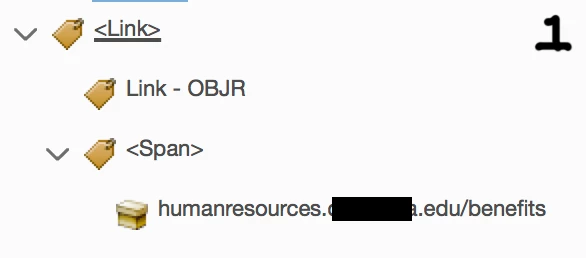
 

2) Link tag appears to be set up correctly. This is the way I assume it is supposed to be.
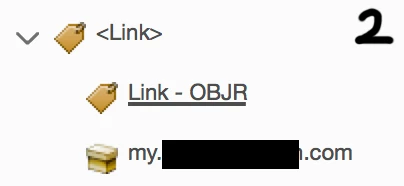


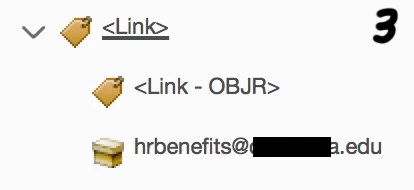
3) Link tag has brackets around Link - OBJR. I made this tag and it comes in with brackets. Is that okay? How do you remove the brackets if it is not okay??
 

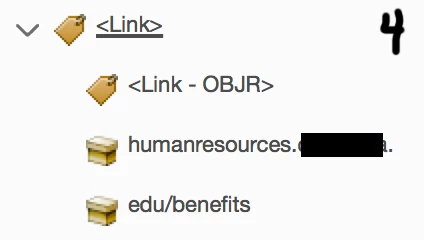
4) The Link tag URL is broken on two lines because the URL breaks across two lines in the text. Also there are brackets around the Link - OBJR tag. Are these okay? How do I fix it?


Any guidance appreciated.

    This topic is closed to new replies. Start a new post to keep the conversation going.

    9 replies

    Bevi Chagnon - PubCom.com
    Legend
    October 11, 2019

    OK, so here's the correct way to add a link to your PDF, and an accessible hyperlink with the <Link> and Link-OBJR combo of tags. This technique is from my course workbooks on accessible PDFs.

    1. Switch to the selection tool (black pointer).
    2. Select the text you want to hyperlink.
    3. Right-click and choose Create Hyperlink.
    4. At the next dialogue box, select the type of hyperlink you want to create.
      • For a website/URL, choose Open a webpage and type in http://www.whateverwebsite.com
      • For an email address, choose the same Open a webpage option but type in mailto:myemail@whatever.com


    |&nbsp;&nbsp;&nbsp;&nbsp;Bevi Chagnon &nbsp;&nbsp;|&nbsp;&nbsp;Designer, Trainer, &amp; Technologist for Accessible Documents ||&nbsp;&nbsp;&nbsp;&nbsp;PubCom |&nbsp;&nbsp;&nbsp;&nbsp;Classes &amp; Books for Accessible InDesign, PDFs &amp; MS Office |
    Participant
    May 1, 2022
    Hi friends.
    Added some hyperlinks by selecting continuous words from one line to another. At the moment that Acrobat creates the link, it is displayed well, underlining only the words selected for the link. As shown in picture 1.
    However, when you close and open the document in Acrobat or another PDF reader, the link underline spans the entire line. As shown in picture 2.
    He tried various forms, pages and groups of continuous words and always the same error.
    
    I use Adobe Acrobat Pro DC 2022.


    Participant
    November 1, 2022

    I'm having this same problem.  Did you ever figure it out or get an answer?

    Bevi Chagnon - PubCom.com
    Legend
    October 11, 2019

    Link tagging is in "evolution." That is, it's beging clarified by the ISO PDF standards committee, and also by the PDF Association.


    Consequently, depending upon which software program you're using for the source document and which software for the conversion/export to PDF, you'll see different tag structures for links.


    One question at a time:

    1. SPAN tags. Leave them. The <Span> tag is inteded to convey information about the text, such as visual formatting (blue and underlining) or additional information (like E= expansion text that clarifies an acronym, USDA = US Department of Agriculture). At this time, none of our assistive technologies are processing them and doing anything for their users, but hopefully that will improve in the future.


    2. Brackets around Link-OBJR.

    This is unclear in the reference materials on PDF/UA. The latest Best Practices Syntax Guide (available for free from the PDF Association, https://www.pdfa.org/resource/tagged-pdf-best-practice-guide-syntax/) shows it in brackets.


    [FYI, this syntax guide is intended for developers of software that create PDFs, not those of us who create content or remediate PDFs. So there is some information we can glean from it that is helpful, but it also contains coding information that we content creators never see or muck around with.]


    However, I haven't seen brackets from any of our software apps we test (MS Office, Adobe InDesign, Acrobat). We only see it as you've shown in versions 1 and 2 above. And we haven't found any problems when testing with AT (assistive technologies).


    3. Hand-made <Link-OBJR> tag.

    Acrobat doesn't have the Link-OBJR tag available when assigning tags in the Tag tree (Properties). And it doesn't create it with brackets when we insert a new hyperlink.


    So I'm assuming you hand-typed the tag's name, correct? I don't think that's necessary.


    4. Multi-line <Link>

    What you show is correct:

    2 "bankers boxes" nested inside a <Link> tag.


    Hope this helps,

    --Bevi

    |&nbsp;&nbsp;&nbsp;&nbsp;Bevi Chagnon &nbsp;&nbsp;|&nbsp;&nbsp;Designer, Trainer, &amp; Technologist for Accessible Documents ||&nbsp;&nbsp;&nbsp;&nbsp;PubCom |&nbsp;&nbsp;&nbsp;&nbsp;Classes &amp; Books for Accessible InDesign, PDFs &amp; MS Office |
    coopjackAuthor
    Inspiring
    October 11, 2019

    Thank you for this.


    Regarding #3 and the hand-made <Link-OBJR> tag with brackets – yes, in Acrobat, I went "Control+click > New Tag..." then I typed in Link-OBJR. That's why it has the brackets. 


    I have tried the "Control+click > Find... > Unmarked Links" method to create a Link tag, but it never returns any results. So, I have taken to creating them by hand.


    How do you get Acrobat to create a Link-OBJR tag ??