ChristianBahnsen
Inspiring
December 27, 2018
Answered

Acrobat -- adding a button or menu item to run some javascript to persist CreationDate in metadata

  • December 27, 2018
  • 1 reply
  • 2920 views

I need to persist the original CreationDate of PDFs.  As they get moved to different directories the operating system will update the CreationDate of PDFs.

I'd like to add a button or menu item to Acrobat that a clerk could click or select that would run the following javascript:

this.info.Author = this.info.CreationDate;

This would persist the CreationDate in the Author field.  We always be able to determine the original creation date of the document no matter how many times it gets moved and the OS updates the CreationDate field.

Essentially, I'm looking for a way to build an application-level button or menu item that can run this simple script.  The button/menu item should become active as soon as a document is loaded/opened.

Thanks for any guidance.

Christian Bahnsen
This topic has been closed for replies.
Correct answer Dave__M

Chris,

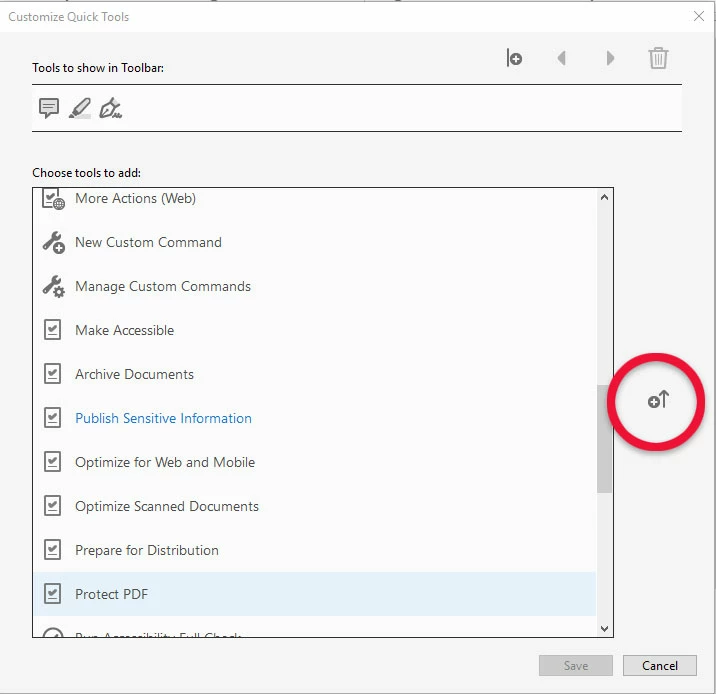
It looks as if you can add an Action to your Quick Tools by clicking on the tiny button as shown below.  I wonder if you were to create your custom script action, save it, and see if it can be added in this way?

Finger crossed.  Let me know if it works!

My best,

Dave

1 reply

Dave__M
Community Expert
Community Expert
December 27, 2018

Would a custom Action work for you?  You can go to the Actions toolset and click on the New Action button, and then select Execute Javascript from the More Tools group.

I hope this is helpful.

My best,

Dave

ChristianBahnsen
Inspiring
December 27, 2018

Dave,

Yes, I've used Actions before and that would probably be the route to go if I can't add a button or menu item to do it.

Thanks for the suggestion.  If the button/menu item route doesn't pan out, I'll mark this as the correct answer.

Chris

Dave__M
Community Expert
Dave__MCommunity ExpertCorrect answer
Community Expert
December 27, 2018

Chris,

It looks as if you can add an Action to your Quick Tools by clicking on the tiny button as shown below.  I wonder if you were to create your custom script action, save it, and see if it can be added in this way?

Finger crossed.  Let me know if it works!

My best,

Dave