
Participant
December 11, 2024
Answered

Acrobat auto populate fields issue

  • December 11, 2024
  • 1 reply
  • 342 views

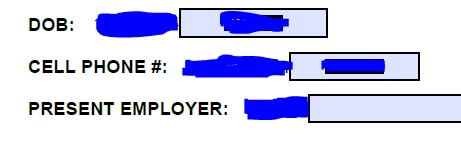
I have a form that is generated from a job application that I add form fields to so that the interviewer can easily fill out the needed sections. Recently when I am creating the form in acrobat it has been autopopulating field next to text that does not need a field. Originally this was not happening, and I cannot figure out how to get it to stop. I have included a screenshot for reference.


This topic has been closed for replies.
Correct answer try67

There isn't really a way to stop it from doing that. It probably picks up the text followed by a colon and then an empty space and thinks a field should go there. Just delete them manually after they are created.

1 reply

try67
Community Expert
try67Community ExpertCorrect answer
Community Expert
December 11, 2024

There isn't really a way to stop it from doing that. It probably picks up the text followed by a colon and then an empty space and thinks a field should go there. Just delete them manually after they are created.