infomamun
Inspiring
June 8, 2023
Question

Acrobat can't print custom size paper

  • June 8, 2023
  • 1 reply
  • 946 views

Hi There,

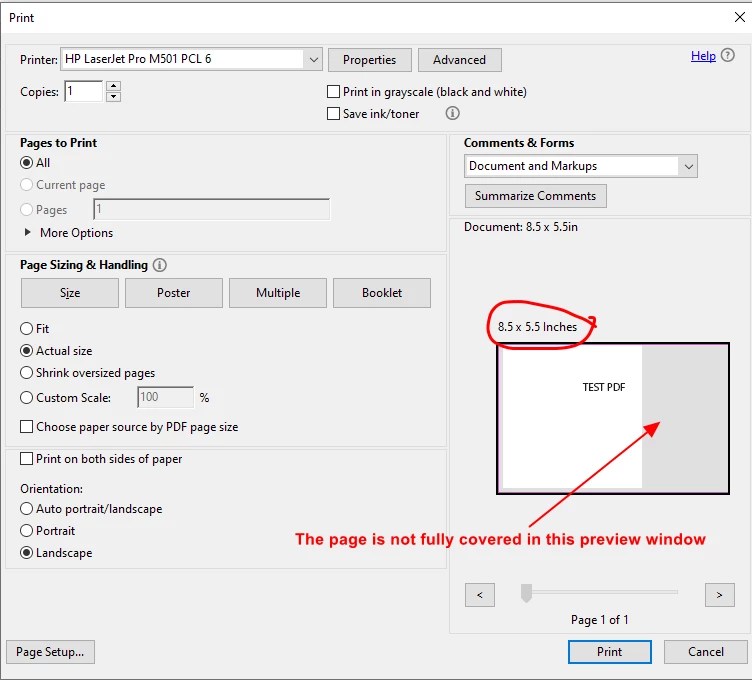
I have converted a 8.5×5.5 inch MS Word file to PDF by Acrobat and while going to print, I can see that the page is not fully covered in the Previewer Window and after pressing "Print" button, it is showing error messages. The page is however spooling off from the printer but blank. Surprisingly, A4 page PDF can be printed well using the same printer.


Anyone have an idea why this error is occuring and how to resolve this?


Thanks in Advance.
 

This topic has been closed for replies.

1 reply

Abambo
Community Expert
Community Expert
June 8, 2023

What is your page size as defined in the printer driver? What is your Acrobat version? Please give us the exact version (Help→About Acrobat).

ABAMBO | Hard- and Software Engineer | Photographer
infomamun
infomamunAuthor
Inspiring
June 10, 2023

Before going through print process, I have set custom paper size 8.5×5.5 in my printer properties/preferences with a custom name and that Profile comes up automatically while giving Print command from acrobat.


I have attached the Acrobat version information with this reply.


Thanks