Participant
September 17, 2019
Question

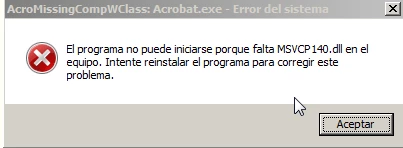
Acrobat can't start because MSVCP140.DLL is missing

  • September 17, 2019
  • 1 reply
  • 5442 views

Hello,

What can I do with this problem? I can't start adobe acrobat. 

Tried repairing the installation. Removing and re-installing. All to no effect.

Will there be a fix?
    This topic has been closed for replies.

    1 reply

    Amal.
    Legend
    September 17, 2019

    Hi There, 


    Thank you for reaching out, as described above you are geting the error "MSVCP140.DLL is missing" while opening Acrobat, correct?


    Launching 64-bit versions of some Adobe products, shows an error message stating that msvcp140.dll file is missing. This problem is caused because the VC redistributable files are not installed properly.


    What is the version of the Adobe application installed on your computer? To check the version of the application please use the link - https://helpx.adobe.com/acrobat/kb/identify-product-version.html

    Try to update the application to the latest version. Go to Help > Check for updates and check if that works for you. To know more about the latest version available, please use the link - DC Release Notes — Release Notes for Acrobat DC Products  


    If it still doesn't works


    Reinstall the files by running the vcredist_x64.exe  files from the following locations. Use Windows Explorer to navigate to the following locations on your computer.

    Run the vcredist_x64.exe at the following locations resolve this issue:

    \Program Files (x86)\Adobe\Adobe Creative Cloud\CoreSync\customhook\vcredist_x64.exe

    \Program Files (x86)\Adobe\Adobe Creative Cloud\CoreSyncV1\customhook\vcredist_x64.exe


    Let us know how it goes for you


    Regards,

    Amal
