



JonathanBuller
Participant
May 18, 2026
Question

Acrobat Chrome extension filling disk with logs

  • May 18, 2026
  • 1 reply
  • 76 views

We’re seeing lots of computers with completely full disks in our environment, on investigation it’s the Chrome logging directory that’s full of 4MB log files that appear to be constantly creating. The name of the folder is the Acrobat’s extension ID. 
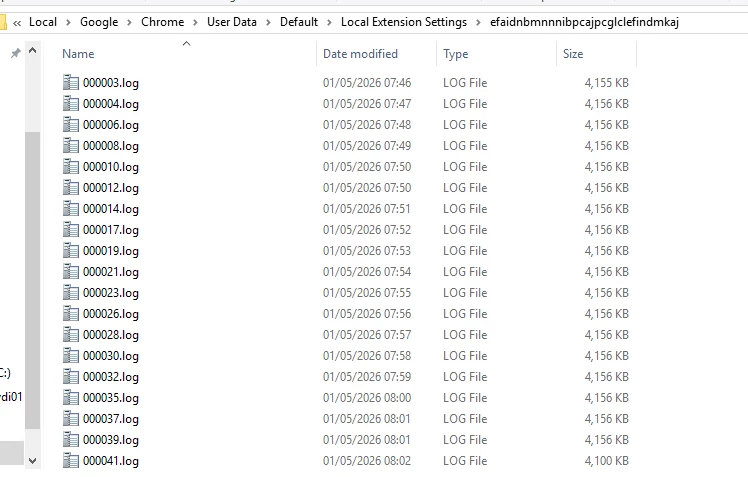
We can delete them but they come back, only way to stop it is to remove the Chrome extension. Anybody seen this before?

    1 reply

    Amit Goel
    Adobe Employee
    Adobe Employee
    May 19, 2026

    Hi ​@JonathanBuller ,


    Thank you for reporting this — we'd like to investigate further. Could you please share the following details?

    Environment Details
    1. OS: Windows or Mac?
    2. OS Version
    3. Chrome Version
    4. Acrobat Extension Version

    Files from the affected folder
    From the folder `Local Extension Settings\efaidnbmnnnibpcajpcglclefindmkaj`, please share:
    5. One `.log` file (e.g., `000003.log`)
    6. One `.ldb` file (if present in the same folder)
    7. The `manifest*` file (if present in the same folder)

    You can zip these three files together and attach them to your reply.

    Also, a couple of quick questions:

    • Is this happening on a specific machine or across multiple machines in your environment?
    • Are these machines managed via any MDM/enterprise policy?

    This will help us pinpoint the root cause. Thanks for your patience!

    JonathanBuller
    Participant
    May 22, 2026

    Hi - it's on Windows 11 Enterprise 24H2. Chrome version is 148.0.7778.168, can’t see a way to get the extension version. Is there a way I can send the files without posting them publically?


    We're seeing this on multiple machines, and we use AD group policy. 

    Anand Sri Bhattacharya
    Community Manager
    Community Manager
    May 22, 2026

    Hello ​@JonathanBuller 


    I hope you are doing well, and thanks for reaching out.

    You can send the files in a direct/private message to the Product team. Click on the community profile name, then select send message. Please add the community thread and the issue title in the direct/private message for the record.


    Also, could you please share the extension version as well from this location: chrome://extensions/?id=efaidnbmnnnibpcajpcglclefindmkaj

    You can include all these details in the direct/private message.

    Regards,

    Anand Sri.