
Participant
March 11, 2025
Question

Acrobat Classic (2024) will not be set as default

  • March 11, 2025
  • 1 reply
  • 1058 views

I created a .mst file with the Acrobat Customization Wizard for the new Classic version and set the option:
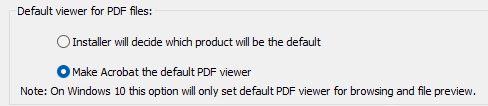
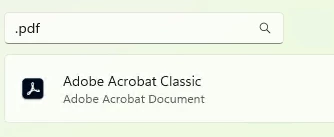
After installing the .pdf is successfully set to Acrobat Classic and when opening a pdf all is fine.
Except that Acrobat seems not to recognize this, because after opening Acrobat, it asks "to set as default".
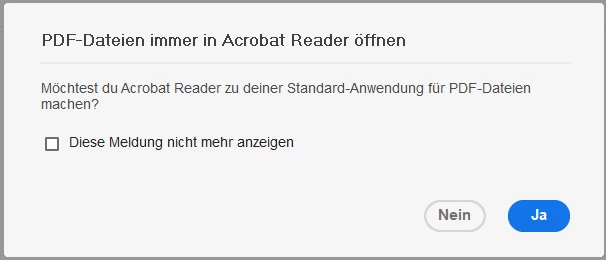
(Sorry is german)

Anyone have this issue maybe or is this maybe a Acrobat issue?

Thanks!

1 reply

Souvik Sadhu
Community Manager
Community Manager
March 14, 2025

Hi @sw_2724,


Hope you are doing well. Sorry for the trouble.


Have you tried resetting the default app for PDF files, and re-assigning Acrobat to it?

This could be a glitch in the initialization of the process which a simple reset-and-reassign can fix.


Also, you can stop this by going to Preferences-> General-> uncheck the checkbox saying "Show me messages when I launch Acrobat."


Hope this helps.


Regards,
Souvik.

sw_2724Author
Participant
March 20, 2025

Hello @S. S 
That's a manual task, and this is not practical in a company environment. If I go in the settings and reassign "Acrobat Classic" to ".pdf" the "default" message is gone.

I was able to find out how to suppress the message.
Maybe this is a Windows issue or a Adobe issue, but it is not fully complete.

If I set the option to make it default, I expect that there is no message in the application to set it as default.

A bare metal installation, defining the file assocation during the MEMCM Tasksequence has not problem after logging in.

Souvik Sadhu
Community Manager
Community Manager
March 28, 2025

Hi @sw_2724,


Thanks for writing back!


You might want to try the below steps:

Hope this helps.


Regards,
Souvik.