Participant
December 5, 2024
Answered

Acrobat Convert all Spots to Process

  • December 5, 2024
  • 3 replies
  • 665 views

I've recently noticed that when I go into Ink Manager and select Convert all Spots to Process, then save the file, close it, and open it again, the spot colors are back. Has anyone else experienced this?

This topic has been closed for replies.
Correct answer JR Boulay

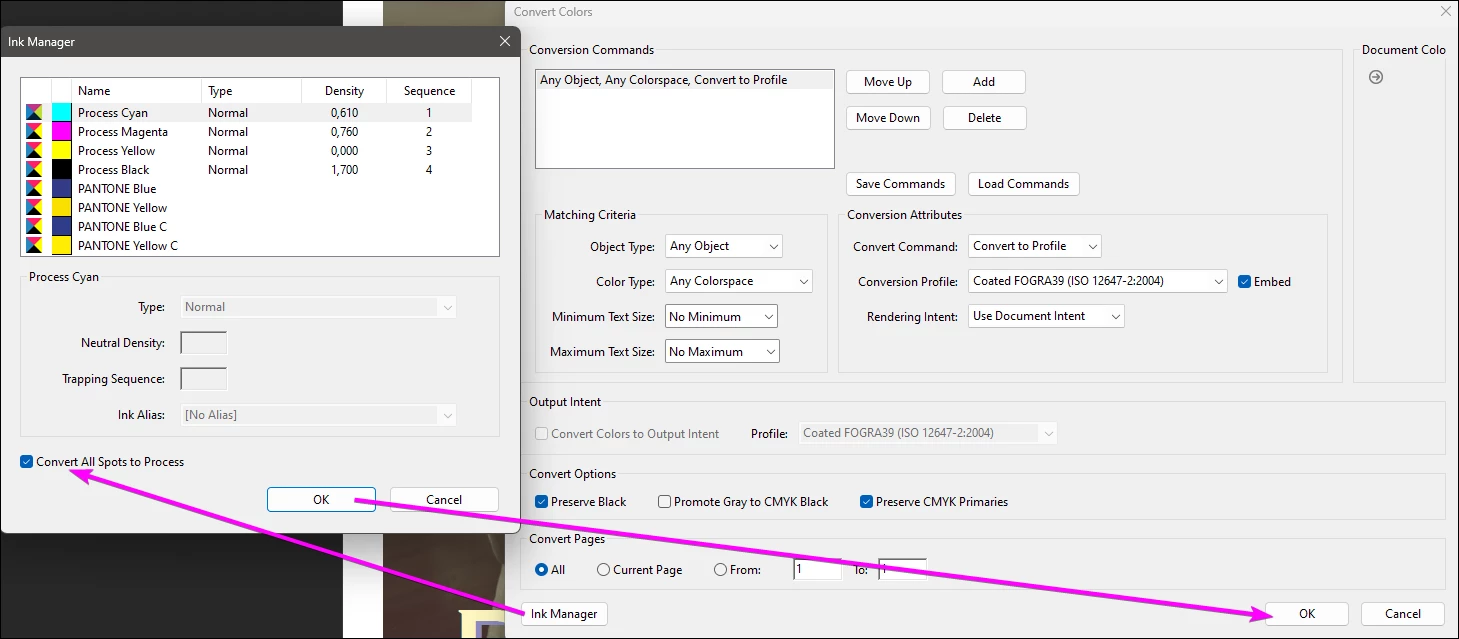
Clicking "Convert all Spots to Process" is not enough.
You need to do this, and then click on the OK button in Convert Colors to apply.
 

3 replies

JR Boulay
Community Expert
JR BoulayCommunity ExpertCorrect answer
Community Expert
December 6, 2024

Clicking "Convert all Spots to Process" is not enough.
You need to do this, and then click on the OK button in Convert Colors to apply.


Acrobate du PDF, InDesigner et Photoshopographe
Karen OsAuthor
Participant
December 6, 2024

Thank you. That worked. I was using Ink Manager under Print Production.

JR Boulay
Community Expert
Community Expert
December 5, 2024

[MOVED TO THE ACROBAT DISCUSSIONS]

Acrobate du PDF, InDesigner et Photoshopographe
leo.r
Community Expert
Community Expert
December 5, 2024

As far as I understand, you're referring to Ink Manager in Acrobat (not InDesign). This is the InDesign forum, Acrobat is here:


https://community.adobe.com/t5/acrobat/ct-p/ct-acrobat?page=1&sort=latest_replies&lang=all&tabid=all&topics=label-generaltroubleshooting

Karen OsAuthor
Participant
December 5, 2024

Thank you. I shall post to the proper forum

Thank you,
Karen

Karen Oswald
[PERSONAL INFORMATION REMOVED BY MODERATOR - THIS IS AN OPEN FORUM NOT ADOBE SUPPORT, PLEASE DO NOT POST PERSONAL INFORMATION]