
Participating Frequently
July 10, 2025
Question

Acrobat DC freezing when bulk form field name change in Mac

  • July 10, 2025
  • 1 reply
  • 935 views

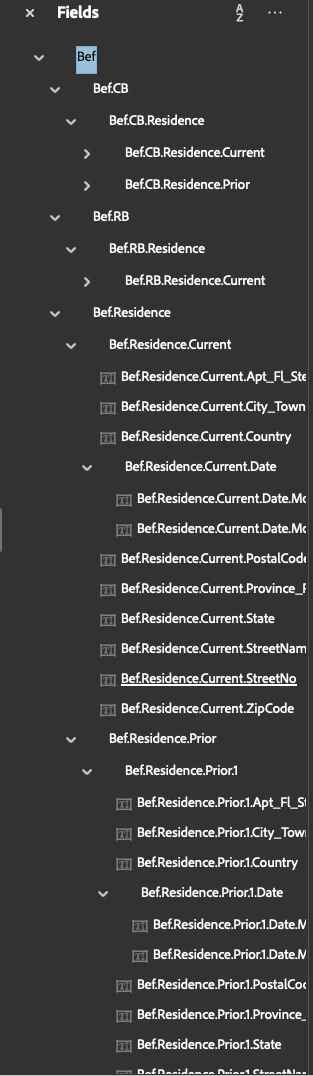
For a few weeks now (and this continued after installing the latest update and trying various fixes like unistalling and reinistalling and changing security preferences, every pdf that I try to bulk change nested form field names immediately freezes once I press enter to change the names. For example, as SS shows, if I try to change Bef at the top to something else, like Pet, the second I press enter acrobat freezes and crashes. Driving me nuts., I cannot find a fix, please help! 
 

1 reply

creative explorer
Community Expert
Community Expert
July 10, 2025

@AmandaSesq518 I have a feeling that levels or number and depth of your nested fields are a primary suspect. Acrobat might struggle to process the renaming operation across a large, complex hierarchy, especially when it needs to update all child fields. I would try and simplied it and don't have so many levels


m
Participating Frequently
July 10, 2025

THanks for your reply. I initially created these forms over a decade ago. I have been making bulk form field changes for years. once in a while I have had crash problems, but never like this. The snippet I shared is part of a 30 page pdf with hundreds of form fields. I extracted one page to change a smaller batch at a time and even that didnt work =/ 

Community Manager
July 10, 2025

Hi @AmandaSesq518,


Sorry to hear about the freezing issue you’re experiencing when performing bulk form field name changes in Acrobat on macOS. We’d like to investigate this further with our engineering team.


To help us analyze the issue, could you please share the following details:


1. Diagnostic Logs

    Please download and run the Acrobat/Reader Diagnostic Tool.

  • Launch the tool and click Start Diagnostics (ensure Advanced Logging is checked).

  • Reproduce the issue in Acrobat.

  • Once done, click Stop Monitoring and share the Log ID shown.


2. Crash Logs (macOS)

     You can find crash reports here:

     Go to: Finder > Applications > Utilities > Console > Crash Reports (or User Reports)

     Look for recent logs related to Acrobat and share the .crash file(s).

     Alternatively, you can use this help doc: Collect Acrobat crash logs on macOS


3. System Info

  • macOS version: (e.g., macOS Sonoma 14.4.1)

  • Acrobat version: (Go to Help > About Adobe Acrobat)


4. Sample Files & Steps

  • Please share 1–2 sample files where this issue happens.

  • Include the exact steps you’re taking that lead to the freeze.


5. Screen Recording

  • A short video capturing the issue on your system would be very helpful.

  • You can send this via private message on the community if you prefer to keep the recording private.


6. Any recent changes (OS updates, plugin installs, etc.) that may coincide with the issue. Other than bulk processing of forms. 


We’ll route this to our internal team as soon as we have the details. Appreciate your help and patience!


Best regards,
Tariq | Adobe Community Team