
Participating Frequently
March 26, 2022
Answered

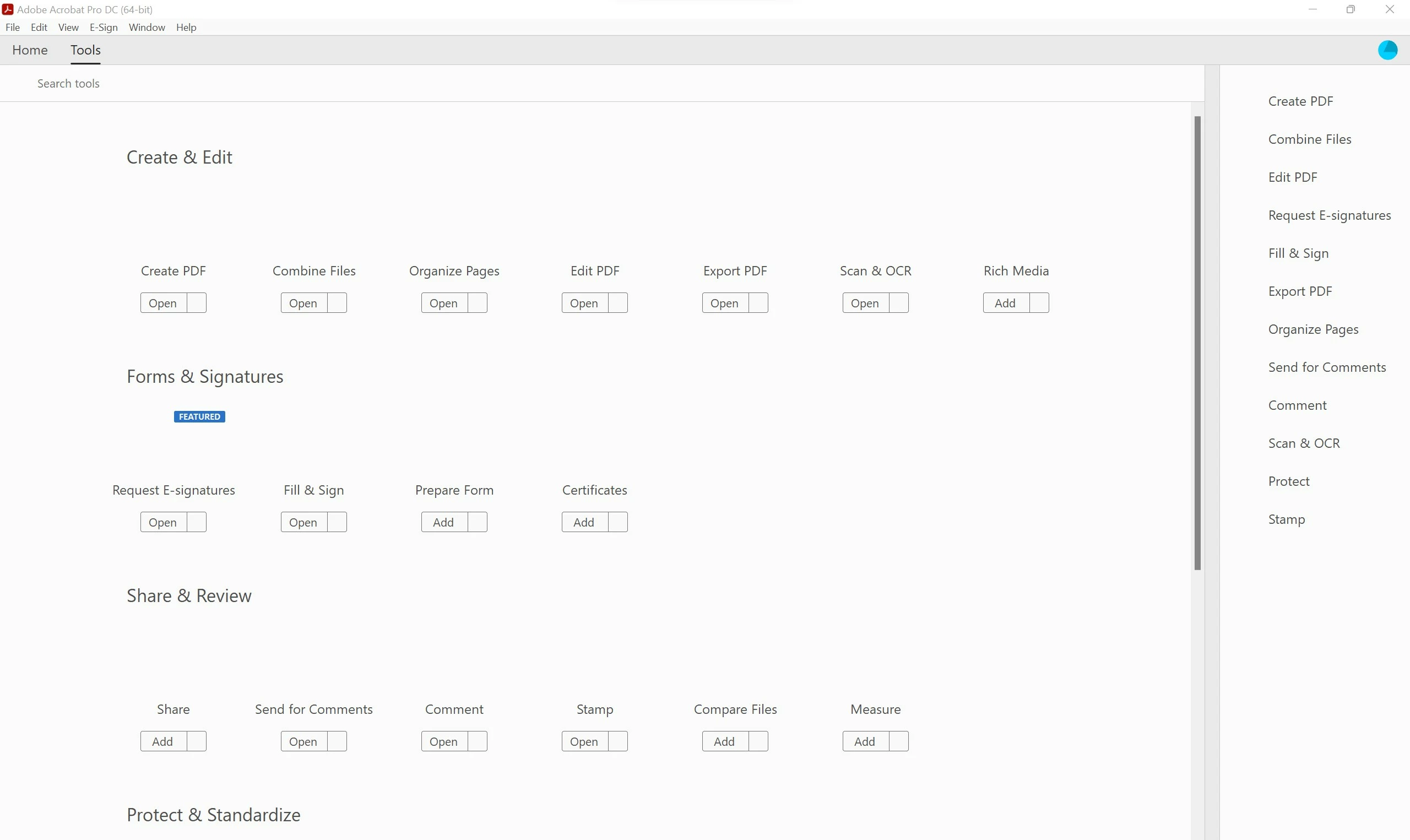
Acrobat DC icon missing in TOOL tab

  • March 26, 2022
  • 10 replies
  • 9941 views

Hi, 
after restart PC all the icons and graphic in ACROBAT PRO DC in the TOOL tab are missing
can't use it at all
I lready tried to uninstall, and using the cleaning tool already, 
also to reset the preference as in another post, but didn't solve.


please help
This topic has been closed for replies.
Correct answer Ted29085131wnuh

I have solved the problem by unistalling the Acrobat DC with the adobe cleaner and Adobe Cloud.

Then install the Acrobat DC solely.

10 replies

Ted29085131wnuhCorrect answer
Participant
April 5, 2023

I have solved the problem by unistalling the Acrobat DC with the adobe cleaner and Adobe Cloud.

Then install the Acrobat DC solely.

Participant
June 5, 2023

This worked for me also.


Participant
March 31, 2023

Guys, I think I found a solution to this issue.  Go to Preferences / Color Management. Try to change CMYK, I have changed mine to the U.S. Web Coated (SWOP) v2, and the toolbars icons and everything else is visible now. You can try the options one by one until it is fixed. You can also change RGB and Grayscale settings as well. 

Participant
April 4, 2023

Hi Erdem28342880x6o0


Your solution works like a charm...! thank you so much man, I have tried multiple, from uninstall, install from the offline installer or the cloud, changing permission tried too but nothing helo, except your color management settings.


Thank you again and have a nice day.

Participant
March 9, 2023

Same issue after the March 2023 update.   Windows 11 64bit.

Also observing multiple “An internal error occurred" messages when attempting to access the menus.

Does anyone have a solution that doesn't involve the 32bit version?

Meenakshi Negi
Community Manager
Community Manager
March 9, 2023

Hi Andy28776827ouc6,


Thank you for reaching out.


Please confirm if the icons disappeared for you after updating the application.

Just to confirm, share the application version number.

Also, let us know if you have tried troubleshooting steps so far.


Thanks,

Meenakshi

Participant
March 9, 2023

Thanks for getting back to me.

I'm on the continuous release cycle.  The version number is 2023.001.20064.

I've tried all the steps above, also using the AcroCleaner tool and the Creative Cloud Cleaner tool.   The only think I haven't tried is the 32bit but as I install via Creative Cloud, I am not given any option.

Thanks again.
Andy

Myriel Mitchell
Participant
December 19, 2022

Hi, I have the exact issue, what was the outcome or fix for this?

Amal.
Community Manager
Community Manager
December 19, 2022

Hi @Myriel Mitchell 


Hope you are doing well and thanks for reaching out. Please remove the application using the Acrobat cleaner tool https://www.adobe.com/devnet-docs/acrobatetk/tools/Labs/cleaner.html , reboot the computer once and reinstall the application using the direct link

https://helpx.adobe.com/acrobat/kb/acrobat-dc-downloads.html


Regards

Amal

Participating Frequently
February 4, 2023

sorry, but this did not help. The error is unchanged. I have Windows11 and 64bit.

Can somebody help?

Amal.
Community Manager
Community Manager
March 30, 2022

Hi there


Please share the requested information via document cloud, upload the files to the document cloud, create the link and share the link in a private message.
For more information about how to share the files please check the help page https://helpx.adobe.com/document-cloud/help/sharing-pdfs.html


Regards

Amal

marcoVoloAuthor
Participating Frequently
March 31, 2022

Hi, 
after reinstalling the SW with a stand alone file, the problem disappeared, 
so i can't upload the file you requested. 
thanks for helping me 

have a nice day

Marco

Amal.
Community Manager
Community Manager
March 30, 2022

Hi there


++ Adding to the discussion


We also require the file  C:\Program Files\Adobe\Acrobat DC\Acrobat\cryptocme.sig

from the affected machine for further investigation of the issue.
You may share the file via document cloud as described here https://helpx.adobe.com/document-cloud/help/sharing-pdfs.html


Also, please collect the Adobe CC logs https://helpx.adobe.com/creative-cloud/kb/cc-log-collector.html, and procomon logs (Win)  https://www.adobe.com/devnet-docs/acrobatetk/tools/Labs/acromonitor.html and share them via document cloud link


Regards

Amal

Meenakshi Negi
Community Manager
Community Manager
March 29, 2022

Hello,


Thank you for reaching out, and sorry about the trouble.


The team is investigating the issue further.

Would it be okay if we schedule a session with you to investigate this issue further?

If yes, please share your preferred time frame in which we can schedule the session.


Thanks,

Meenakshi


Participant
March 27, 2022

I've got the same issue and it's driving me nuts.


No icons, task bar has no icons, tools icons are missing. It's crashes ans will not print.


John

Participant
April 9, 2022

i am having this same issue.


did anyone ever come up with a solution?


Participant
April 9, 2022

Yes, I did a clean uninstall of the 64bit and installed the 32bit.


Everyting work now until the 64bit is fixed.


John

Legend
March 26, 2022

You are missing a number of tools completely (presumably you can use the ones listed by clicking where the icon would be).

- is this a company installation of Acrobat?

- what is the exact version of Acrobat (like 2016.124.98765)? (Not "latest" please)

marcoVoloAuthor
Participating Frequently
March 26, 2022

It's not only icons, 
it is unusable everywhere , like some formatting missing, also in the main page
Version: 22.1.20085.0
thank you 

Bernd Alheit
Community Expert
Community Expert
March 26, 2022

Why can't you use the tools?

marcoVoloAuthor
Participating Frequently
March 26, 2022

Because, not only that is missing, 
as in the attachment picture, also the menu, and other details on the right side
thank you