Known Participant
September 1, 2017
Answered

Acrobat DC Memory Problem

  • September 1, 2017
  • 6 replies
  • 22751 views

Hi folks,

I am running Acrobat DC on an iMac 2010 model, 2.8 GHz Intel Core i5 with 16gb of ram. I keep getting out of memory messages and the Mac is sluggish

especially when Acrobat DC is open. This problem has only recently started. I tried a wee test, I disconnected the ethernet cable so I was not attached to the network or the internet.

Strangely the Mac had as new lease of life.

See the memory usage with Activity Monitor:
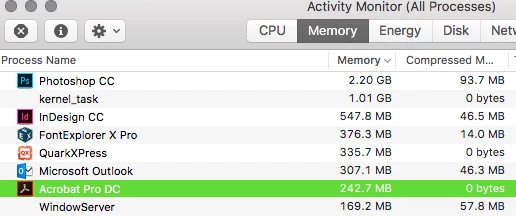
After about 15 minutes I plugged the ethernet cable back in, so I had internet access again.

See the memory usage again below:
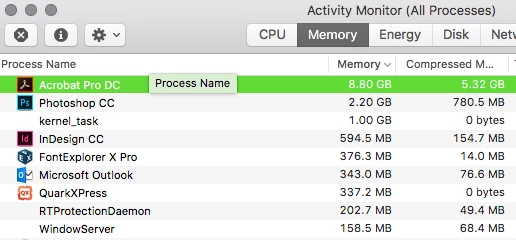
The Mac was back to being slow again. If I left Acrobat DC open the 'Out of memory' error would appear again.

I have reinstalled Acrobat DC but this did not cure the problem. Does anyone have any ideas?

This topic has been closed for replies.
Correct answer Pascal Duperron

In that case - unless somebody form Adobe can chime in - your best bet to get Adobe's attention is to file a bug report: Feature Request/Bug Report Form


Thank you Karl but the link is dead.

MY SOLUTION was to downgrade to Acrobat Pro XI.

Follow the link for walkthrough. Acrobat DC uninstalled Acrobat XI | How to get Acrobat XI back

PDF TOOLBOX and PITSTOP installed and everything is working as expected.

Acrobat Pro DC is a nightmare from the begining. I don't know anybody that is happy with the change from previous Acrobat release. Working in production for a printer since 20+ years I know what I am walking about.

6 replies

Participant
January 22, 2019

Has anyone looked into the tracker preferences in Acrobat DC (2015) pro. I am having the same problems as Michael. I changed the tracker preferences to suspend tracking and the memory problem seems to have gone away. Has anyone tried this?

Legend
September 18, 2017

I suggest you give it a try without Pitstop if you've run out of other ideas.

Karl Heinz  Kremer
Community Expert
Community Expert
September 18, 2017

A very easy way to run without 3rd party plug-ins is to go into Acrobat's preferences, then select the "General" category and turn on "Use only certified plug-ins" - only Adobe's own plug-ins are certified, so no 3rd party plug-in will load.

Participant
September 20, 2017

Hello Karl and "Test Screen Name" and thank you for your suggestion. It still happen without the plugins (Pitstop and PDF ToolBox).  You can see here in the activity monitor that Acrobat Pro DC is growing his memory usage up to 61,08Go and still going up without any open documents at this moment. We had to quit Acrobat before other applications turn into Paused mode.

Participant
September 18, 2017

Having the same issue myself with an iMac 27'' 2014, El Capitan. Using Acrobat Pro DC with PitStop 2017 and PDF toolbox installed.

Looking at the memory usage, it keep increasing without touching the application until it reach the maximum RAM and then paused the apps.

We have other Mac station without this issue. I can't find what is causing this to happen.

AnandSri
Legend
September 15, 2017

Hi Michael Tully,

If you have any security software installed, please disable it temporarily and check. If the issue still persists, please check it in the root account. Enable the Root account and check.

You can disable the root account later.

Keep us posted with the results.

Regards,

Anand Sri.

Legend
September 15, 2017

Has anyone seen this problem without PitStop installed?

AnandSri
Legend
September 6, 2017

Hi Michael Tully,

I tried replicating the issue at own end, but was not able to replicate it as the Acrobat DC is working without any issue.

Please uninstall the Acrobat DC, run the Uninstaller file from the  Application menu.

Then remove all the Acrobat folders from system and user profile(Mac OS).

Restart the computer and reinstall the Acrobat DC from Download Pro or Standard versions of Acrobat DC, 2017, XI, or X

Let us know how it goes.

Regards,

Anand Sri.

Known Participant
September 15, 2017

Hi, I have uninstalled and re-installed Acrobat DC and Enfocus Pitstop Pro 17, this has not solved the "System has run out of Memory" problem, please advise.

AnandSri
Legend
September 1, 2017

Hi Michael Tully,

As per the description above, you are getting an Out Of Memory Error in Acrobat DC, Is that correct?

Please try the steps from the following thread: Out of memory error in Acrobat DC

Try to disable the Protected View feature for PDFs from: Protected View feature for PDFs (Windows), Adobe Reader

* NOTE: Disabling the Protected View is only for testing purpose, please enable it back. It is not suggested to keep the Protected mode off due to security issues.

You may try to reset the preferences and check: How to reset Preference settings in Acrobat.

Let us know how it goes.

Regards,

Anand Sri.

Known Participant
September 4, 2017

Hi Anand,

Thanks for your help, but unfortunately this did not solve the issue. I had specified in my question that I was using an iMac, two of the solutions given were for a Windows PC. So I tried deleting the preferences. Acrobat ran well for about 10 minutes, however the memory pressure was increasing again, leading to a slow down.

Please see screen grabs from Activity Monitor,

The Memory used by Acrobat DC is even more than before. Is there anything else I can do?

Known Participant
September 4, 2017

Just to show you the error message I get -

This was the memory usage in Activity Monitor:

Please note the error does not happen when Acrobat DC is closed.