
Acrobat DC Pro crashing when trying to "Save as"
Acrobat keeps crashing whenever I try to save a document.
I have tried unchecking the Save as optimizes for fast web view.
I have made it my default pdf viewer.
I have run the repair tool.
I have unticked the Show online storage
I just get this error:
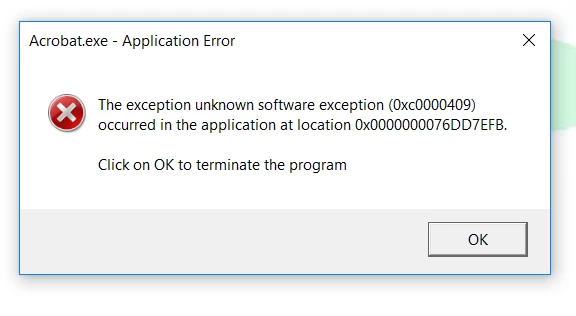
Details below:
Account Detail:
User Rights: Admin
User Account Control: Limited
Process Integrity: Medium
Profile Type: None
Acrobat Detail:
Sandboxing: Off
Captive Reader: No
Multi-Reader on Desktop Support: Off
Applications Installed:
Office Version: Office 2016 32-bit
Available Physical Memory: 4194303 KB
Available Virtual Memory: 3729728 KB
BIOS Version: ALASKA - 1072009
Default Browser:
Default Mail: Microsoft Outlook
mapi32.dll
Version: 1.0.2536.0 (WinBuild.160101.0800)
Display Detail:
Screen Width: 2560
Screen Height: 1440
Number of Monitors: 2
Number of Mouse Buttons: 7
Has Mouse Wheel: Yes
Has Pen Windows: No
Double Byte Character Set: No
Has Input Method Editor: Yes
Inside Screen Reader: No
Graphics Card: Intel(R) HD Graphics 4000
Version: 10.18.10.4358
Check: Not Supported
Installed Acrobat: C:\Program Files (x86)\Adobe\Acrobat DC\Acrobat\Acrobat.exe
Version: 17.9.20058.234434
Creation Date: 2017/07/02
Creation Time: 23:33:40
Locale: English (United Kingdom)
Monitor:
Name: Intel(R) HD Graphics 4000
Resolution: 2048 x 1152 x 59
Bits per pixel: 32
Monitor:
Name: Intel(R) HD Graphics 4000
Resolution: 2560 x 1440 x 59
Bits per pixel: 32
OS Manufacturer: Microsoft Corporation
OS Name: Microsoft Windows 10
OS Version: 10.0.15063
Page File Space: 4194303 KB
Processor: Intel64 Family 6 Model 58 Stepping 9 GenuineIntel ~2794 Mhz
Session Detail:
Boot Type: Normal
Is Shutting Down: No
Network: Available
Inside Citrix: No
Inside VMWare: No
Remote Session: No
Remote Control: No
Using JAWS: No
Using ZoomText: No
Using Windows-Eyes: No
Using NVDA: No
 AdChoices