
Participant
March 15, 2017
Question

Acrobat DC Pro - Editing Text field issues

  • March 15, 2017
  • 2 replies
  • 992 views

I have been having issues when editing text fields. This one imparticular; How do I stop acrobat from re-numbering my paragraphs? I need this to stop. I do not want to retype 1000+ page publications

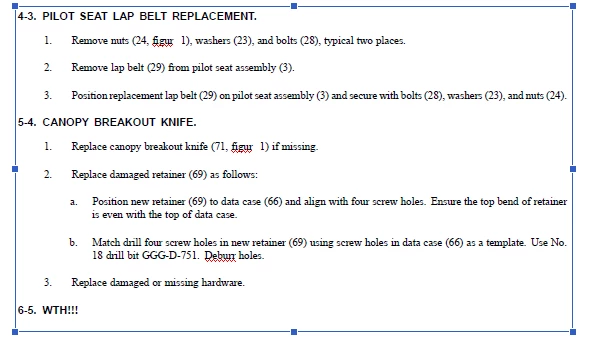
I have a paragraph with numbered headings, I hit EDIT and select in the field. No worries. I actually edit some text and then Acrobat changes the numbered paragraphs!!

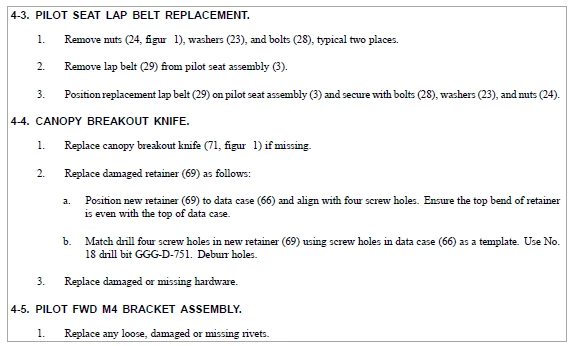
Before:
AFTER I start editing
Message was edited by: ANTHONY RUEST

This topic has been closed for replies.

2 replies

Adobe Employee
April 17, 2017

Hi  anthonyr6944752 ,

Sorry for the issue you are facing. We are able to reproduce the issue at our end. Issue has been forwarded to the concerned team for investigation.

Regards,

Priyanka

Participant
May 9, 2017

Can you also explain why this happens when using the Edit Text on pre-existing PDFs....

While making simple edits to paragraphs, I have noticed that on many occasions "letters" will be dropped from full words. Spellings were correct before I clicked into a text field.

Below are examples of words I found in 1 PDF that were changed by Acrobat to misspellings:

figur 1 to figure 1

Baffl to baffle

Fittin to fitting

Iockwashers to lockwashers

Filte to filter

identificatio to identification

arming-firin to arming-firing

flexibl to flexible

firewal to firewall

baffl to baffle

fille to filled.

Ventral fi to ventral fin

Confir to confirm

1-H1AAC to 01-H1AAC

Hellfir to hellfire

Fla washers to flat washers

Fixe to fixed

Aeriol ThixO to Aeriol Thixo

Flang to flange

Configuratio to configuration

try67
Community Expert
Community Expert
April 14, 2017

This is not a text field, but static text in the file. PDF files were never meant to be edited in such a way, and doing so is tricky and risky, and should be avoided as much as possible. Hopefully you can get access to the original file used to create this publication. If you do, edit that file in the native application that created it and then generate a new PDF from it.

If you can't do that, try exporting the PDF to a more suitable format for editing, like Word or InDesign. Edit the file there and then create a new PDF from it.
Trying to do this task in the PDF directly is a fool's errand, and will cost you a lot of time, efforts and headaches.