Participant
August 10, 2022
Question

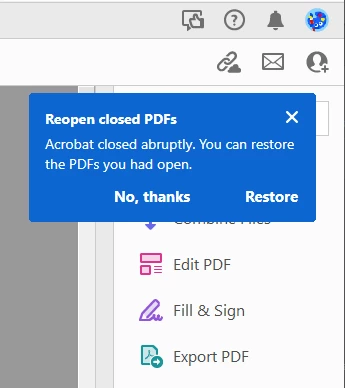
Acrobat DC Pro Notification Appearing Opening Every File

  • August 10, 2022
  • 1 reply
  • 349 views

Abobe Acrobat DC version 2022.001.20169 on Windows 10 

Can anyone help me get rid of the attached notification that is popping up every time a document opens?

I have tried unchecking notification boxes in Acrobat Preferences under Tracking. Also unchecking all the notification boxes in Creative Cloud Preferences.
 

This topic has been closed for replies.

1 reply

AkanchhaS8194121
Legend
August 10, 2022

Hi there,


Thanks for reporting this to us.

Since you haven't been able to disable the notifications from the preferences setting.

Run this cleaner tool to remove the existing installer and application's files traces once. 

https://www.adobe.com/devnet-docs/acrobatetk/tools/Labs/cleaner.html

and then Download the Acrobat installer from here:

https://helpx.adobe.com/acrobat/kb/acrobat-dc-downloads.html


If this doesn't work, then. 

We'd like you to gather the following details and share them with us for further investigation. 

Please collect the Adobe CC logs https://helpx.adobe.com/creative-cloud/kb/cc-log-collector.html  and 

ProcmonLogs :

https://www.adobe.com/devnet-docs/acrobatetk/tools/Labs/acromonitor.html

Share them via document cloud as explained here https://helpx.adobe.com/document-cloud/help/sharing-pdfs.html


Thanks,

Akanchha