
Participant
January 8, 2025
Answered

acrobat dc to acrobat pro

  • January 8, 2025
  • 2 replies
  • 967 views

I recently upgraded my laptop to Windows 11, which resulted in the removal of previously installed software, including Adobe Acrobat and AutoCAD. Using the company portal, I downloaded Adobe Creative Cloud and installed Acrobat from there.

However, I am unsure whether this version of Acrobat allows me to create forms and add fields such as e-signatures, text boxes, or other interactive elements. Previously, I had access to Acrobat DC, but it seems this version is no longer available in Adobe Creative Cloud.

Could you please advise on the functionality of the current version from the image below and whether additional steps are required to enable these features?
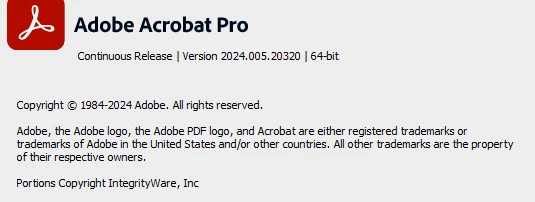


advise if these features are included in this version?

Correct answer PDF Automation Station

Yes those features are included.  Acrobat Pro replaced Acrobat Pro DC.  The interface probably looks a lot different.  If you click the menu and select Disable new Acrobat it will probably look the way you are used to.

2 replies

Participant
January 9, 2025

SAINTUS

PDF Automation Station
Community Expert
Community Expert
January 8, 2025

Yes those features are included.  Acrobat Pro replaced Acrobat Pro DC.  The interface probably looks a lot different.  If you click the menu and select Disable new Acrobat it will probably look the way you are used to.

anas_4404Author
Participant
January 8, 2025

Thank you so much. I followed your advise and selected Disable New Acrobat. Now the add digital signature featuer is there. Any advise on why that feature wasnt there?

Thank you. 

PDF Automation Station
Community Expert
Community Expert
January 9, 2025

Everything is there.  It's just hard to find if you're not used to the new interface.