
bo_johnson
Participant
April 10, 2015
Question

Acrobat DC - Turn off Mobile Link notifications

  • April 10, 2015
  • 12 replies
  • 40560 views

The first time I opened Acrobat DC after upgrading, I didn't mind the Mobile Link notifications - after all, it was a new feature, I like knowing about new features.

But to pop up another notification every time I open a document is incredibly distracting and annoying.

This is overkill, and hides part of my document for about 7 seconds, with no obvious way to close the notification.
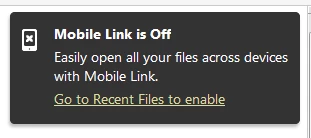
This small indicator is plenty to keep me informed that Mobile Link is off

Please make it so that large Mobile Link notification does not persist after I've already ignored it.

This topic has been closed for replies.

12 replies

Participant
March 12, 2024

I have also just upgraded to Acrobat Pro and this message is just so so annoying, has anybody find out if it can be switched off?


DigitalDawg
Participating Frequently
October 29, 2015

As with many members who have posted on this thread, I too am unable to stop the "New Features Have Arrived" from appearing each and every time I open up Acrobat. Also, the page display preference does not hold.

Can't believe that the Adobe "team" hasn't corrected this, considering how long these posts have gone on. This is a real mind-xxxx to we who have to put up with it.  Come on, fix it.

StuartProvince
Participant
December 4, 2015

I have also got very cross since this pop up appears and keeps appearing over the last few days. Clicking the pop up doesn't work for me. The only comfort is that its not just me!

Participating Frequently
October 8, 2015

To add two more cents to this discussion -- incredibly annoying and counter-intuitive. The x in the phone icon looks like a way to turn it off and of course it does the opposite.  The whole DC interface makes this tool feel like overly sweet candy.

Known Participant
October 8, 2015

The most annoying thing is that you're more or less forced to go along with these upgrades, because there is no sustainable alternative.

There are clearly three major trends in the software industry today - movement towards the subscription business model, movement towards cloud storage and a general dumbing down of interfaces. The subscription model gives the developer control, while the cloud storage gives them access to our data, and the dumbing down ensures that the system appeals to the widest possible audience.

Participating Frequently
October 7, 2015

Thanks for the tip about getting rid of the annoying "feature". Overall, I'd say that Adobe DC is a significant downgrade from the prior version. All cloud, all ads, nothing new.

I can't image why I'd use Adobe as my cloud provider... Trusting our proprietary data to the same folks who developed the security nightmare of Flash? The other danger of using Adobe cloud as part of your workflow is that you're putting your company at risk for every new Adobe "feature" and price increase. Just say no to proprietary clouds.

Happy Dave
Participant
September 7, 2015

I see a report abuse button on the forum can we have one in acrobat DC for abuse by Adobe,  this pop up is doing my head in every time I open a pdf to view it, it still comes back.yes I have clicked on the balloon message but it just shows up again.

Participant
August 9, 2015

Oh wow now Adobe is also applying the flat Windows-8 Mickey-Mouse touch UI but they don't find time to add a simple close box

On could get the impression that the software is nagging users on purpose

Participating Frequently
July 29, 2015

Agreed, turn this pop-up off! So annoying.

denise20
Participant
July 7, 2015

I see Adobe say "We have taken your valuable feedback" but I hear "We knew you would hate it but we don't care because the stats show we make more money."

They deliberately made it intrusive and sticky.

Other intensely irritating aspects of Adobe Reader DC:

1. It says we have the option to share information with Adobe and that is switched on by default. That is simply false and misleading. It shares information until you find the way to switch that off. It is not an option to share, it is an option to stop sharing.

2. There is no way that I have found to turn off the right hand sidebar which is just screen clutter for a PDF Reader. In fact, I also find it intensely irritating even on my copy of Acrobat Pro XI, which I expect to more than just read stuff with. After using it for a year, I still keep 9.5 on another computer because it is just so much easier and more logical to use.

3. For reading and annotating PDFs, I find iOS PDF Expert to be vastly superior to anything made by Adobe, even when I have a computer next to me.

4. The floaty lower toolbar should be taken out and shot.

5. When you set the preferences to prevent all messages from Adobe, I expect it to work, and not still get these pop up messages with no x box.

All in all, the cynical marketing people at Adobe should be banned from getting anywhere near product design. Please design products according to what people want, and then sell great products. You may get good stats to start with by these ploys, but you alienate people and drive them away in the long run.

Participating Frequently
July 7, 2015

I agree with you. This is my point. If we are PAYING for software, then don't act like it is Free software and treat us like crap. Developers for paid software need to understand how to listen to the clients..

Participating Frequently
May 14, 2015

Talking about UX ... duhhh

Once you have clicked on this (I absolutely agree, it is a very) annoying message, only then you get the option to turn it off, or at least to get rid of it.

It would be nice to have an 'X' (=close) on this pop-up in the first place to shut it down forever, unless you want to enable the proposed feature in preferences (although I can't find this back in Preferences, but that could just be me).

I'm pretty used to Adobe interfaces, but this one was frustrating me a lot (hmmm, an understatement).

Thanks to this forum where I found out how to get rid of it.

But I sincerely hope this is not a new Adobe policy ... "Hi happy user, join our forum (community) if you want to know how to turn certain features on or off" ...

Participant
May 4, 2015

This is an incredibly annoying notification with no obvious means of disabling.  The idea that just clicking on it may have made sense during development but it is counter intuitive for those of us trained not to click on ads or pop-up notifications that we're NOT interested in.  I update because of security not because I want to spend my morning learning about the latest features, how to disable notifications of new features, or how to get the default view back to the way it was before I updated.

AmbooS
Adobe Employee
Adobe Employee
May 5, 2015

Hi desnr,

We have taken your valuable feedback.

Thanks,

-Amboo

Participating Frequently
May 10, 2015

This is why I don't use Adobe Acrobat to view Adobe files. It's bloated, the interface is completely counter-intuitive and it pushes stupid notifications at me. I use PDF Xchange Viewer (a light, third-party PDF viewer) for viewing and only open Acrobat when I need to edit.