
Participant
April 10, 2015
Answered

Acrobat DC — window background color

  • April 10, 2015
  • 29 replies
  • 30924 views

I've just installed DC and the new interface looks great, but I would like to be able to change the window background colour from white without having to go to fullscreen mode. It's grey in other versions of Acrobat.

At the moment, it's very hard to see what the page size is when it's a white page on a white background.
    This topic has been closed for replies.
    Correct answer AshuMittal9644438

    Hi Josh, All,

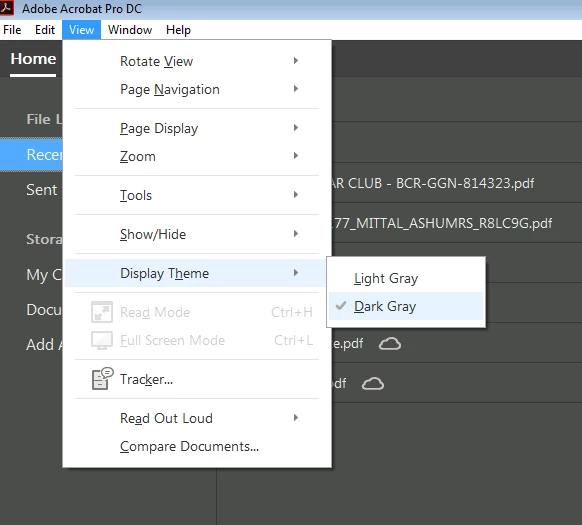
    Acrobat DC update released today (10th May, 2016) introduces a new darker theme. Please open Acrobat DC application and go to Help > Check for updates to apply the latest update (2015.016.20039).


    Next, go to View > Display Theme > Dark Gray and restart Acrobat.

    More details here: What's new in Adobe Acrobat DC

    Please try this out and let us know your feedback.

    Thanks,

    -ashu

    29 replies

    Participant
    November 17, 2015

    And my background for my layout is light gray so you can't see it's borders against the light gray background in Acrobat. Is it that hard to change it to whatever color you choose?

    Participant
    November 25, 2015

    Is there an answer to this question yet?  I can't stand color.  Totally can't see where my scanned docs from the background.  But I don't know how to go back to the older version.  Can someone help delete this version and install the old version?  Thanks.

    Participant
    October 24, 2015

    I agree with the OP: the washed out light color is pretty bad. Please update or allow customizing.

    _v__design
    Participant
    October 22, 2015

    I must agree - revert the dark background or preferably add option to customize theme colors ASAP - the light background realy sucks!!!

    Bernd Alheit
    Community Expert
    Community Expert
    October 23, 2015

    Did you install the updates?

    Known Participant
    October 16, 2015

    Well, thank you Adobe for listening! I just opened Acrobat Pro DC (Version 2015.009.20069) and I have my mid-grey background color back! Nice contrast with my document edges, much more used to that and much easier on the eyes!

    Thanks for listening, I don't know if this thread made a difference but a big thanks to the developers and product managers of the !Acrobat Pro DC team.

    BTW, I attended AdobeMax last week and it was an AMAZING experience...anyone thinking about going next year, just do it! See you in 2016 in San Diego!

    Known Participant
    October 16, 2015

    Also just to add, love the multitabs for documents!

    Caligula
    Participant
    October 5, 2015

    Adobe please. I could not agree with Fellow9 more. The minute I downloaded Adobe Acrobat DC and took a look at the horrible borders and background, I am really tempted to go back to Adobe Acrobat X, support or no support. Can Adobe and Microsoft please stop trying to please the Apple crowd. They live in their own little world and they belong there. Let us PC users control our own destiny.

    Inspiring
    July 17, 2015

    Just downloaded Acrobat Pro DC... the light grey background is terrible and I'm disappointed to hear that there is no option to change it. Adobe, please stop making arbitrary UI changes for sh!ts & giggles, it'll piss off your users. What is your rationale for going to a 20% grey background? You realize that most PDF documents have white backgrounds, right?

    #fail

    Known Participant
    July 7, 2015

    Seeing as this isn't implemented yet, I will revert back to Acrobat XI for now until this feature becomes available.

    For anyone that's interested in going back to Acrobat XI:

    https://helpx.adobe.com/creative-cloud/kb/acrobat-dc-uninstalls-acrobat-11.html#how_to_get_Acrobat11_back

    Participant
    June 30, 2015

    A pro application should give the final user the chance to set what he needs. There cannot be a default background suitable for all kinds of works for all the users. So please give a chance to set one's favorite settings, which may also vary from work to work. Otherwise I will be forced to change software. I cannot work with this eye-burning background.

    Participant
    June 24, 2015

    I also agree with all those above.

    @ Dov: Acrobat Development has been considering since 12 April. Are they done yet?

    Dov Isaacs
    Legend
    June 24, 2015

    No.

    - Dov Isaacs, former Adobe Principal Scientist (April 30, 1990 - May 30, 2021)
    Participant
    June 29, 2015

    Is there some kind of low-contrast design disease going around? This was a terrible, eye-burning idea when Microsoft did it with Office 2013, and it remains a terrible, eye-burning idea now. Please - I hope the development team does more than just "consider" this issue, and that this isn't a sign of design to come. Our rods and cones are crying out for relief.

    Participant
    June 18, 2015

    So inconsistent for an Adobe product. This has to be an oversight. InDesign and Photoshop have options to change the background darker, so why not Acrobat? I've only been working with Acrobat DC for 15 minutes and the blaring white and constant straining to see page edges was enough to induce a headache. Hope to see some darker background choices soon!