rachelcenter
Legend
July 16, 2026
Answered

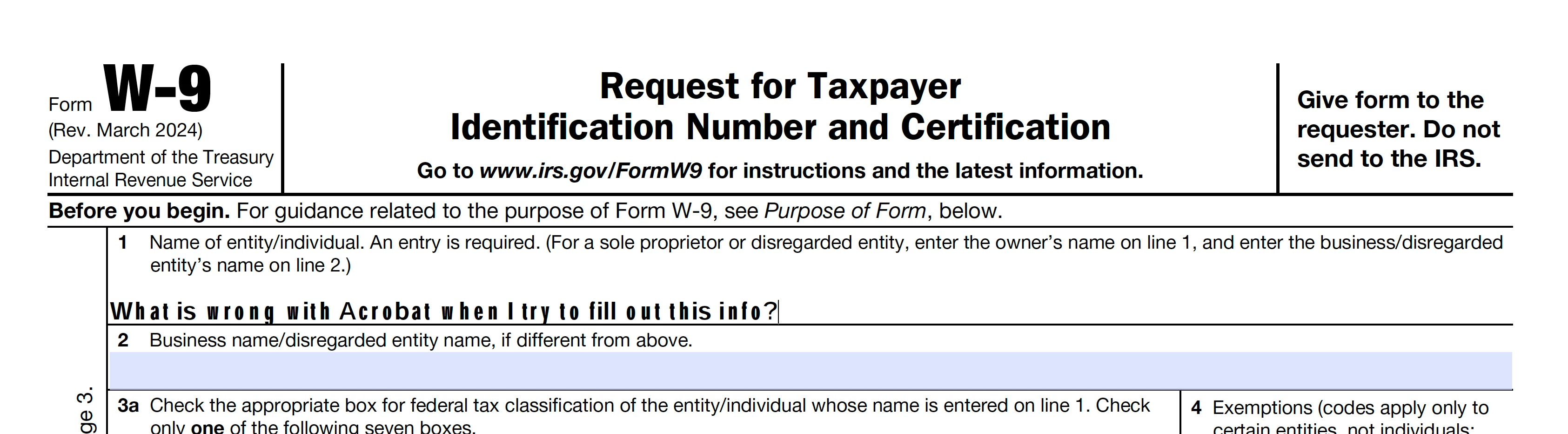
Acrobat displaying mismatched fonts when doing fill document

  • July 16, 2026
  • 3 replies
  • 38 views

When I open an empty W9 in acrobat and choose “fill & sign” look at how its typing out the fonts. They look wild. They look mismatched. its never done this before. so I went to preferences and changed fonts to arial but it didnt fix the issue. Side note: when i’m filling out this bug report theres a dropdown that says “Category” and i dont see acrobat listed in order for me to choose that option. 
 

Correct answer rachelcenter

“Select the text > More options (…) > turn off Character spacing.”

When you say select the text, do you mean highlight it. cause i dont see “more options” anywhere. where is “more options”? 

“Type plain letters/numbers (no symbols) and compare behaviour.” i dont understand, is the text that I’m typing already not simple? if not, how do you get simple text? What is “simple text”? i just figured any text is plain ole normal text when you do a fill and sign on a pdf. 

“try a different pdf”

i guess the pdf was the issue because I downloaded a random empty government i-9 form and started typing and the text looks normal. 


3 replies

rachelcenter
rachelcenterAuthorCorrect answer
Legend
July 17, 2026

“Select the text > More options (…) > turn off Character spacing.”

When you say select the text, do you mean highlight it. cause i dont see “more options” anywhere. where is “more options”? 

“Type plain letters/numbers (no symbols) and compare behaviour.” i dont understand, is the text that I’m typing already not simple? if not, how do you get simple text? What is “simple text”? i just figured any text is plain ole normal text when you do a fill and sign on a pdf. 

“try a different pdf”

i guess the pdf was the issue because I downloaded a random empty government i-9 form and started typing and the text looks normal. 


Meenakshi0101
Community Manager
Community Manager
July 21, 2026

Hi rachelcenter,


Thank you for the information and for confirming the issue was PDF-specific.

We downloaded the form and filled it out. It looks fine on our end. We asked you to fill in the form fields with random text and send it to us so we can check whether it appears correctly on our end. 

It appears that the font assigned to the form field might not be available on your machine. That is the reason the text appears like this. However, when you complete the form and send it, the text should appear fine on the receiver's end. 

As the document is secured, there is not much that can be done from our end.


Let us know if you need any help or have questions.


Thanks,

Meenakshi

kglad
Community Expert
Community Expert
July 16, 2026

did you change your font and letter spacing?

rachelcenter
Legend
July 16, 2026

no. it just appears like that. ive never seen it do that before

Meenakshi0101
Community Manager
Community Manager
July 17, 2026

Hi rachelcenter,


Thank you for reaching out, and sorry for the trouble caused.


It appears to be a font-related issue. Could you please share the completed PDF form where you encountered the issue? You can enter random text in the fields, as this is just for testing purposes. Additionally, please provide the version numbers of Acrobat and your operating system currently installed on your machine.


Let us know if you need any help.


Thanks,

Meenakshi

kglad
Community Expert
Community Expert
July 16, 2026

post this in the acrobat forum, https://community.adobe.com/p/acrobat 


and change your title slightly to avoid a duplicate post error.