
Participating Frequently
August 8, 2018
Answered

Acrobat distiller, stopped working

  • August 8, 2018
  • 2 replies
  • 6437 views

Acrobat distiller just quits on opening and comes up with an error message
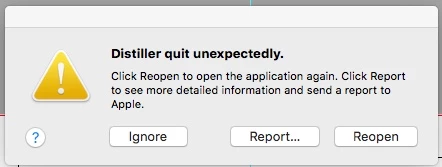
I have tried uninstalling and reinstalling the latest version the acrobat suite from Adobe , same result.

Is Adobe aware of any conflict issues with the latest Mac OS?

10.13.6 high sierra

I use this all the time for distilling files for print so it is painful.

This topic has been closed for replies.
Correct answer Dov Isaacs

Hi Abambo,Dov

I am in Australia, just for reference.

Attached is a distiller profile joboptions preset, downloaded from a magazine that wanted their PDFs provided to a particular spec.

West Australian News magazine

I have worked in magazines as well as freelance now, and alot the headaches come when you receive ad PDFs from alot of different designers, some are fine, but alot are not.

And against a newspaper printing deadline that’s a huge issue.

Getting them distilled to your exact preset, ensures that they rip first time no issues….that’s the efficiency from a magazines point of view.

Andrew


Why not install that set of joboptions, if they are not already so-installed, into InDesign and export PDF using them? That should work.

          - Dov

2 replies

Participant
December 19, 2019

Can you please tell me how to get a PDF out of InDesign using the PRINT BOOKLET function? It prints to a PostScript file, which then has to be distilled, and Distiller keeps crashing. I've tried using the "Create PDF" in Acrobat, but it then opens Distiller "in the background" and it still crashes, so I still can't get a working PDF for a booklet.  

Any assistance would be appreciated.

Dov Isaacs
Legend
August 8, 2018

What version of Acrobat are you running?

Also, you mention you are “distilling files for print.” What applications on MacOS output only PostScript forcing you to distill to get PDF. For typical graphic arts applications such as InDesign, Illustrator, and Photoshop, proper PDF (whether for print or display) is obtained by exporting PDF (InDesign) or saving as PDF (Illustrator and Photoshop).

          - Dov

- Dov Isaacs, former Adobe Principal Scientist (April 30, 1990 - May 30, 2021)
Participating Frequently
August 8, 2018

HI Dov,

if working in Illustrator for press printed work( which i like for small artwork jobs). You use the distiller to PDF eps files using certain specs like Pre-press artwork.

You drag it on the app. Simply saving to PDF from illustrator even with compression settings can’t do the same quality of job.

Am using all the latest versions, ...Adobe are investigating because they can’t figure it out either….

Abambo
Community Expert
Community Expert
August 8, 2018

https://forums.adobe.com/people/andrew+boddy  wrote

Am using all the latest versions, ...

A version number would be nice as "the latest version" may not be true anymore with the next release...

You will not make Dov's day with such a workflow (and neither mine). Saving an Illustrator to EPS just to convert it to PDF is creating lesser quality files.

Illustrator's Save As PDF  gives you all the options you need to create highest quality print ready files.

ABAMBO | Hard- and Software Engineer | Photographer