
Participant
October 29, 2024
Answered

Acrobat doesn't accept all certificates

  • October 29, 2024
  • 1 reply
  • 731 views

Dear Sirs,

I'm trying to digitally sign a pdf but Acrobat doesn't allow to use some certificates I need. Here are my certificates:
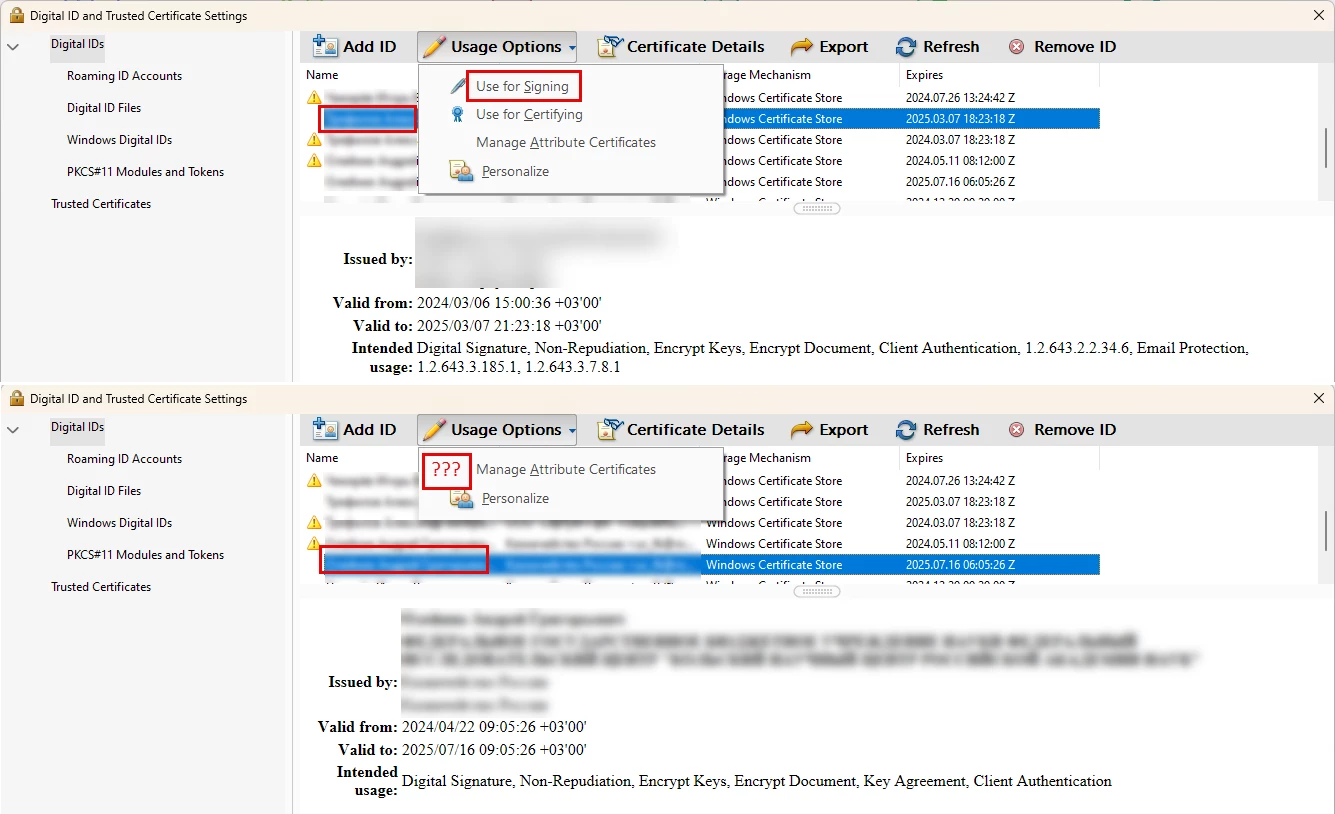
 

As you can see some certificate is available for signing. But the other one is not...


What's the reason of this?


Thank you very much!

This topic has been closed for replies.
Correct answer MikelKlink

Please check Digital Signatures Guide for IT » A: Changes Across Releases » 11.0.9 - 

The key usage extension of a usable certificate (if not absent) must contain nonRepudiation or digitalSignature.

The extended key usage extension (if not absent) must contain emailProtection, codeSigning, anyExtendedKeyUsage, or 1.2.840.113583.1.1.5 (Adobe Authentic Documents Trust).


Your second certificate does have both nonRepudiation and digitalSignature key usages but only one extended key usage, clientAuthentication but none of the required ones.

A certificate made for client certification alone cannot be used to sign PDF documents.

1 reply

MikelKlink
MikelKlinkCorrect answer
Participating Frequently
October 29, 2024

Please check Digital Signatures Guide for IT » A: Changes Across Releases » 11.0.9 - 

The key usage extension of a usable certificate (if not absent) must contain nonRepudiation or digitalSignature.

The extended key usage extension (if not absent) must contain emailProtection, codeSigning, anyExtendedKeyUsage, or 1.2.840.113583.1.1.5 (Adobe Authentic Documents Trust).


Your second certificate does have both nonRepudiation and digitalSignature key usages but only one extended key usage, clientAuthentication but none of the required ones.

A certificate made for client certification alone cannot be used to sign PDF documents.