


Participant
Aug 3, 2023 2:04 PM UTC
Answered

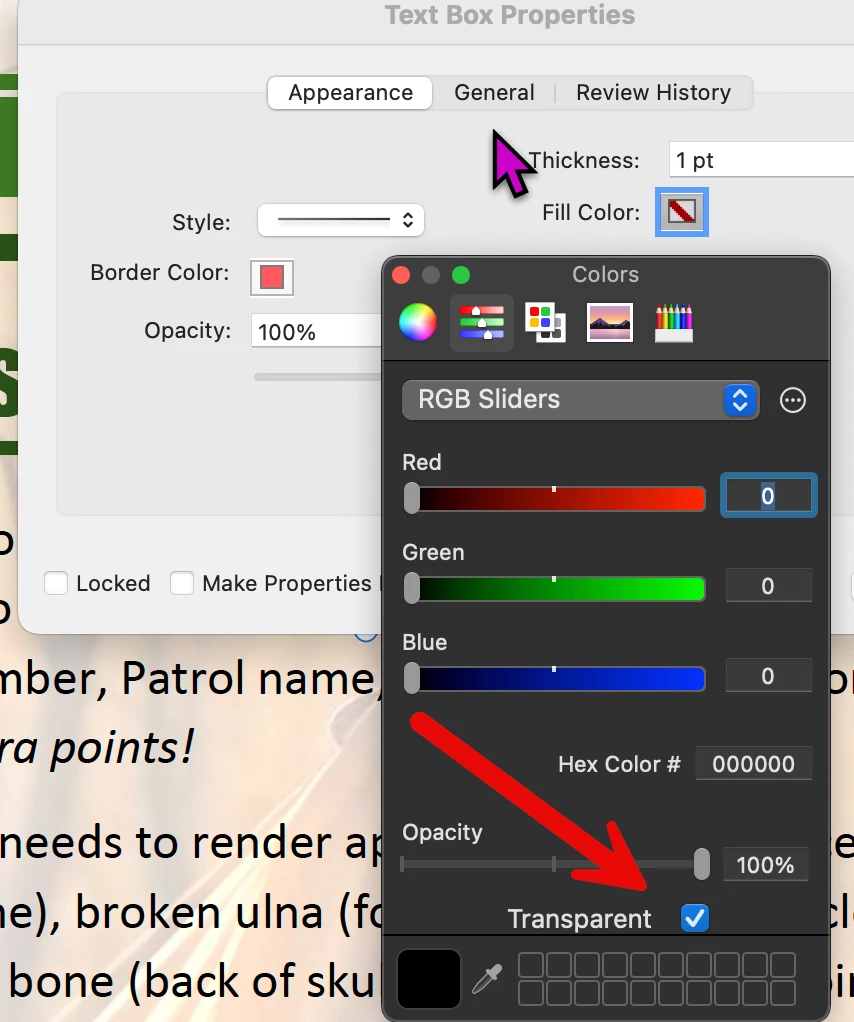
Acrobat doesn't have transparent fill for shapes

I'm trying to create transparent fill shapes (with an outline) in Acrobat DC, and there is no "transparent fill" option. Where did this go?? I've been able to create outlined shapes with transparent fills in every other version of the program.

Dave Creamer of IDEAS
Dave Creamer of IDEASCorrect answer
Community Expert
Apr 19, 2025 9:32 PM UTC

Resurrecting this only to point out the latest versions of Adobe CC have removed even this option. They want users to pay for another program like InDesign or PhotoShop to use such a basic feature. After all, they charge more for CC packages if they provide all the basics in a single program!


The answer was about the commenting tools (mark up). You can still make them with transparent fills.


David Creamer: Community Expert (ACI and ACE 1995-2023)

8 replies

Document Geek
Community Expert
Community Expert
Aug 3, 2023 2:13 PM UTC

You have to bring up the old Properties bar to access it. https://documentgeek.blogspot.com/2018/06/how-to-make-pdf-drawing-markup-with-no.html

Translate
Participant
Aug 3, 2023 2:28 PM UTC

Thanks for sending the link, but there is no instruction as to how to bring up the old Properties toolbar. Any quick instruction for that?

Translate
Document Geek
Community Expert
Community Expert
Aug 3, 2023 2:32 PM UTC

Cmd/Ctrl+ E


Translate