Hi @footmego,
Sorry for the troubled experience.
Thank you for the detailed write-up — the Task Manager observations and the specific version number are genuinely helpful, and I want to make sure we get to the root of this rather than just patch around it.
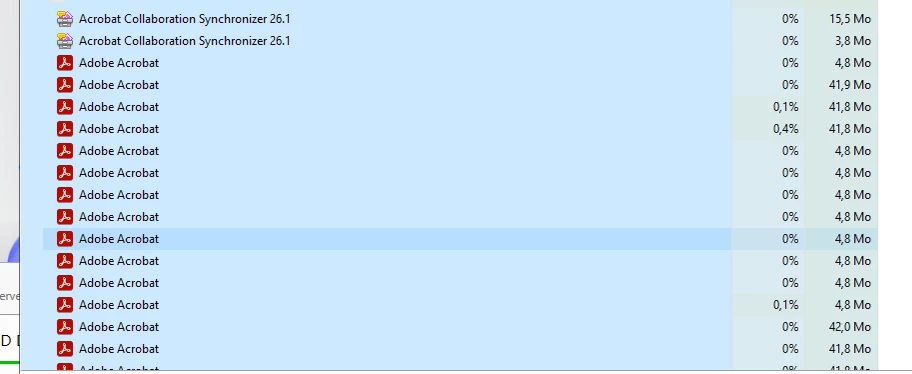
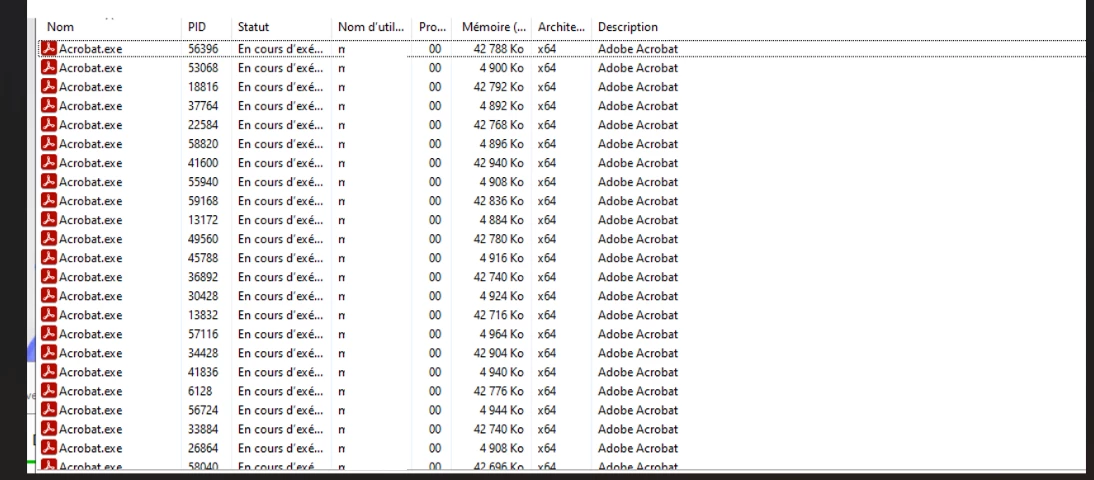
What you're describing — processes accumulating per user that don't self-terminate — points to something actively preventing Acrobat from completing its own shutdown sequence. Under normal conditions, closing a PDF or exiting Acrobat triggers a cleanup chain that terminates child processes. The fact that this chain isn't completing on its own, and that a manual kill or session reconnect resolves it, tells us the termination signal is either not reaching those processes or something in the environment is blocking it.
Before I escalate this for deeper investigation, I need to build a clearer picture of the environment. Could you help with the following?
─── Environment ───────────────
1. Windows Server version and build number
2. RDS role configuration
Are you running a single Session Host, or a full deployment with Connection Broker and load balancing across multiple hosts?
3. User profile management
Are profiles local, roaming (UNC path), or managed by a third-party tool?
If third-party: which product and version? (e.g., FSLogix, Citrix Profile Management, AppSense, Liquidware, Ivanti)
4. Security software on the Session Host
Antivirus or EDR product name and version.
(AV/EDR products that hook process handles are a known factor in this class of issue on RDS — not assigning blame yet, just need to rule it in or out.)
5. Acrobat install mode
Per-machine or per-user installation?
6. Licensing type
7. Any third-party Acrobat plug-ins installed?
Check: C:\Program Files\Adobe\Acrobat DC\Acrobat\plug_ins\
─── Process behaviour ──────────────────────
8. When exactly do the processes stop responding?
Specifically: does the accumulation happen (a) when a user closes individual PDF documents while Acrobat stays open, (b) when the user exits Acrobat entirely, or (c) after a session disconnect — even if they didn't close anything?
9. What state are the orphaned processes in?
Open Task Manager > Details tab > right-click a column header > Select columns > add "Status".
Are the zombie Acrobat/AcroCEF processes showing as Running or Suspended?
10. Handle count on the orphaned processes
If you have Sysinternals Process Explorer available:
- Find one of the stuck AcroCEF.exe processes
- Lower pane > Handle view
- What types of handles are open? (file handles, registry keys, mutexes, sections?)
- Are any handles pointing to paths outside the user's profile or Acrobat's own directories?
11. Are ALL users on the server affected equally, or only certain user accounts?
(If it's selective, that narrows it to profile or permission differences rather than a system-wide configuration.)
12. Is this a fresh installation of 26.001.21529, or an in-place upgrade from a previous version?
If upgraded: what was the previous version?
─── Event log snapshot ────────────────────────
13. Run the following and share the output:
:: Application log — Adobe errors in the last 7 days
Get-WinEvent -FilterHashtable @{LogName='Application'; StartTime=(Get-Date).AddDays(-7)} |
Where-Object {$_.ProviderName -like '*Adobe*' -or $_.Message -like '*Acrobat*'} |
Select-Object TimeCreated, Id, LevelDisplayName, Message |
Format-List | Out-File C:\Temp\adobe_events.txt
:: Windows Error Reporting — check if WER is holding process handles
Get-WinEvent -FilterHashtable @{LogName='Application'; ProviderName='Windows Error Reporting'; StartTime=(Get-Date).AddDays(-7)} |
Select-Object TimeCreated, Message | Format-List | Out-File C:\Temp\wer_events.txt -Append
Share the contents of both files (redact any usernames or internal paths as needed).
14. Check for Event ID 243 in the System log:
Get-WinEvent -FilterHashtable @{LogName='System'; Id=243} -MaxEvents 10 -ErrorAction SilentlyContinue
(This indicates Desktop Heap exhaustion — relevant if the environment is close to process handle limits.)
─── One quick test ───────────────────────
15. On an affected session, after Acrobat has been used and processes have accumulated — before killing them manually — run:
tasklist /FI "USERNAME eq <affected_username>" /FO CSV /V > C:\Temp\acrobat_procs.csv
Share that file. The /V flag captures the window title and memory usage of each process, which can reveal whether the "dead" processes are actually crashed (no window title, high handle count) versus still considered active by Windows.
The reason I'm asking for all of this: the behaviour you're describing — processes that cannot self-terminate and hold their memory allocation even after the triggering event is gone — is consistent with a few distinct failure modes:
(a) A security product holding an open handle to the process, preventing Windows from completing the termination sequence
(b) A profile container or FSLogix VHD lock preventing Acrobat from writing its shutdown state, causing it to hang rather than exit cleanly
(c) Acrobat's internal crash recovery mechanism re-launching processes that appear closed from outside
(d) A Windows Job Object wrapping the RDS session that interferes with child process termination signals
Each of these has a different fix path. The diagnostics above will let me determine which one we're actually dealing with and route this to the right team if needed.
Appreciate your patience on this — RDS deployments have more moving parts than a standard workstation, and I want to make sure any fix we suggest actually addresses the cause rather than just masking it.
Alternatively, you can open a support ticket via the Admin console, which will assign a dedicated support person to your ticket.
~Tariq




 AdChoices