Andreas Jansson
Inspiring
June 20, 2019
Question

Acrobat failed to send a DDE command a while after dropping files on Droplet

  • June 20, 2019
  • 1 reply
  • 5073 views

After dropping files on droplets I sometimes get this error: Fatal errorAcrobat failed to send a DDE command".

It takes a while before the message appears.
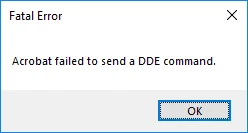
Some seconds or perhaps a minute after the droplet is done with the files. Sometimes it's just one message, sometimes there are lots of them, after each other.

I've done this droplet for a customer, and they get the same error. Sometimes the message appears, sometimes not.

I've uninstalled and cleaned the computer from all acrobat files, and then reinstalled Acrobat DC again.

Thanks,

Andreas

This topic has been closed for replies.

1 reply

Inspiring
July 17, 2019

Hi Andreas,

Apologies for the late reply, I hope you would be able to fix it by now, as described above the Acrobat is failing to send the DDE command. This error may arise due to many reasons like:

  • Acrobat program isn't running properly
  • Acrobat program files are corrupted.
  • Interference from antivirus software.
  • The application may be outdated

You may try the following troubleshooting steps:

  • Close the application and relaunch.
  • Update the software to the latest version, go to Help>check for update
    You may try following the link- DC Release Notes — Release Notes for Acrobat DC Products
  • Repair Installation, go to Help>Repair installation and reboot the system
  • For testing purpose, turn off the antivirus program.
  • For testing purpose, you may try disabling the protected mode, please set the security ON once done with the testing. Go to Edit>preferences>Enhanced security>Turn off the protected mode and UncheckEnhanced Security. Reboot the system and try again.

I hope this will make some difference, do let us know the results.

Regards,
Amal

Andreas Jansson
Inspiring
October 11, 2019

None of the suggestions above helped.

However, after many hours of trial and error, it seems these errors were caued by droplets making use of actions that are no longer available, or that have been changed, in the latest version of Acrobat. I had to find the original description of what the droplet was supposed to do (all steps) and then make a new droplet from scratch, using the latest Acrobat software. Then there have been no errors. So it seems this was due to backward compatibility issues with version of Acrobat that was made available in spring or early summer 2019.