


Acrobat Failing to Launch Correctly; Multiple Adobe Processes Stuck in Background
I’m an IT technician writing this up on behalf of our own support desk. Over the past several months, we’ve seen a large influx of users (must be close to triple figures at this point) reporting that they’re unable to open PDFs. When investigating, we find that Acrobat is creating a background process every time an attempt is made to open a PDF:
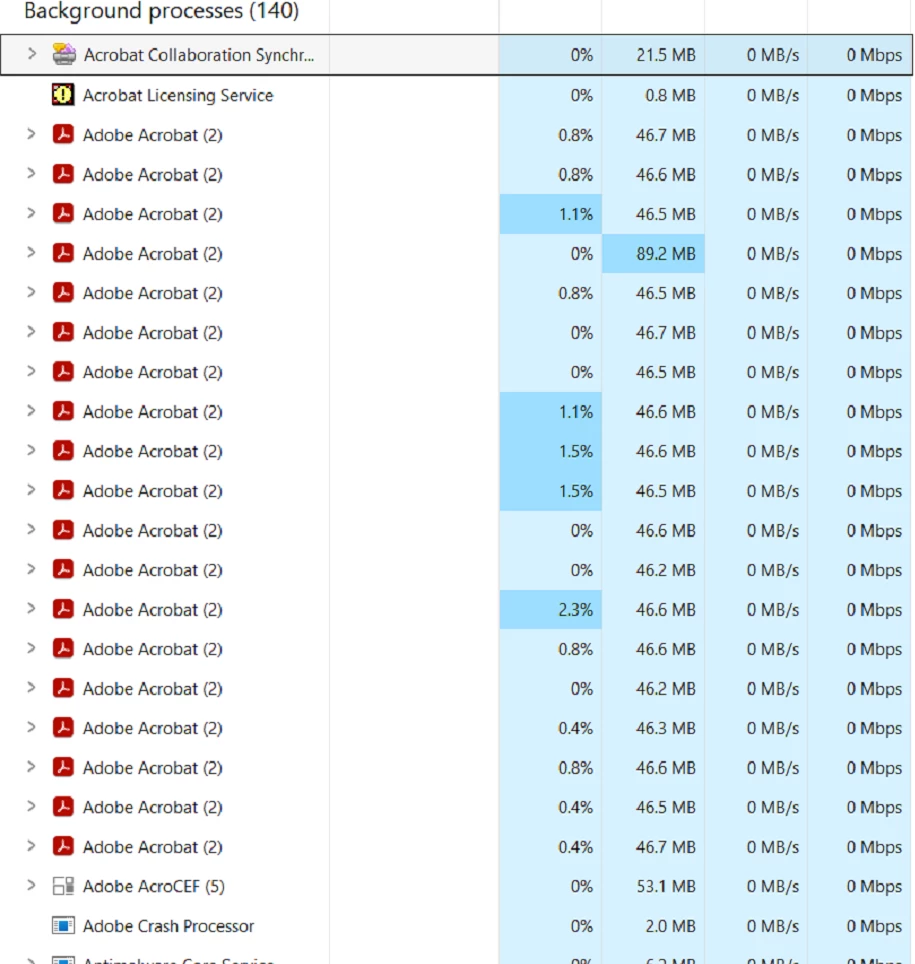
But it doesn’t actually open anything. From the user’s perspective, nothing happens. When this is occurring, the Acrobat client itself also will not load on-screen when opened via the Start Menu or desktop shortcuts, and there are no associated errors at all. The only way to correct this is to close all the Acrobat processes, which will make it start working normally. The problem is that this is only a temporary fix and it soon starts to reoccur for the user.
Some additional info:
- All of our clients work inside Citrix VDIs, a majority of which run Windows 11 24H2.
- This has been occurring for months, so affecting multiple Acrobat versions (last confirmed version it was happening on is 2026.001.21529 (64x).
- Nothing of note in Event Viewer.
- Our clients use a multitude of third party programs when trying to open PDFs, and this has happened across all of our different setups; the behaviour is not limited to just one program with PDF integration, for example.
- From the above screenshot, you can see that Adobe AcroCEF, Licensing Service, and Collaboration Synchronisation Service are also present.
- This happens without warning. No crash report is presented to the user before it starts occurring.
Fixes attempted:
- Disabling enhanced security options inside Acrobat
- Repairing Acrobat installation
- Reinstalling Acrobat
- Using the Acrobat Cleaup Tool
- Disabling Acrobat / Adobe processes on startup
- Renaming the Collab Sync Service (AdobeCollabSync.exe)
This has become a major service issue for us, and we’ve found it impossible to work out what is actually causing it - any insight into exactly why this happens and a real method of mitigating it (rather than having to constantly manually close the Adobe processes) would be much appreciated. Thank you!
 AdChoices