
Participant
March 1, 2018
Answered

Acrobat Finds Printer, but not Scanner?

  • March 1, 2018
  • 2 replies
  • 13578 views

I am using Adobe Acrobat Pro DC on Windows 10.  I print my documents to two main printers: a Brother MFC-5895CW and a Brother DCP-L2540DW.  Acrobat recognizes both of these machines as options to choose from when printing.  However, when I go to scan a document, only the MFC-5895CW is recognized.  I prefer to use the DCP printer.

I can't figure out why when I go to File>Create PDF From Scanner, the "Please Select a Scanner" dropdown list only lists one scanner.
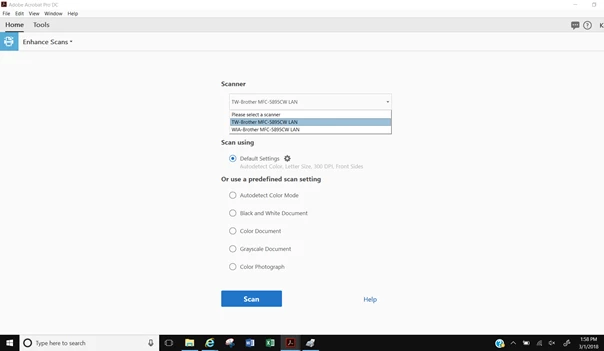
If it recognizes it as a Printer, shouldn't it also acknowledge it as a Scanner.

What do I need to do to have Acrobat recognize my Brother DCP-L2540DW as both a Printer AND a Scanner?

Note: Even when USB is plugged in from printer, the scanner is not recognized.  Also a program that came on my laptop, "Windows Fax and Scan" also only seems to be recognizing the MFC-5895CW,

I am on an HP Envy x360 laptop.

Thanks.

Correct answer Lovekesh Garg

There could be multiple root cause for this issue like drivers problem, connectivity problem, compatibility issue, hardware issue or installation problem. Please try some troubleshoot option available in the link https://helpx.adobe.com/acrobat/kb/troubleshoot-scanner-issues-acrobat.html. If the issue still persist please let us know.

Thanks.

2 replies

Participant
October 17, 2020

This happens EVERY TIME there is an update to Adobe Acrobat DC.  I wish that you would actually improve the software, rather than just making people update something new.  You've not added any useful features or improved functionality since Acrobat X.  Spending hours trying to troubleshoot my scanner every time you make an update is the opposite of productivity. 

Lovekesh Garg
Adobe Employee
Lovekesh GargCorrect answer
Adobe Employee
March 6, 2018

There could be multiple root cause for this issue like drivers problem, connectivity problem, compatibility issue, hardware issue or installation problem. Please try some troubleshoot option available in the link https://helpx.adobe.com/acrobat/kb/troubleshoot-scanner-issues-acrobat.html. If the issue still persist please let us know.

Thanks.