


Participant
May 14, 2025
Answered

Acrobat for edge tools: not found certificates

  • May 14, 2025
  • 1 reply
  • 771 views

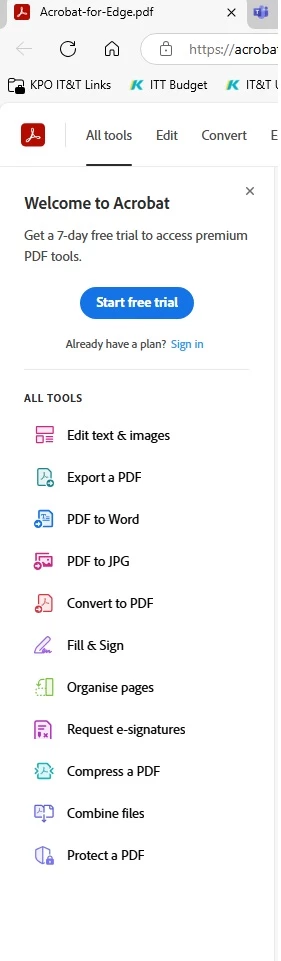
Hello everyone, I installed the Adobe version in the Microsoft Edge browser, but All tools does not have the ability to work with Certificates (Digitaly sign or certify documents and validate...), why? Maybe I need to install something additionally? Help, urgently?

 

Correct answer Meenakshi Negi

Hi hunter_1406,


Thank you for reaching out.


To certify the documents or to add digital signatures, you will need an Acrobat subscription. The feature works only on the desktop application. You will be able to use the tools on the Acrobat web with this subscription. However, the feature will not be available on the web application. Please refer to the information on the following help document: https://adobe.ly/4dgHSMx.

For information on Acrobat subscription, refer to the following page: https://adobe.ly/4j3CmhK


Feel free to let us know if you have any questions.


Thanks,

Meenakshi

1 reply

try67
Community Expert
Community Expert
May 14, 2025

You need a subscription to Acrobat to be able to certify files.

Participant
May 14, 2025

Thank you, can you tell me what subscription level I need?

Meenakshi Negi
Community Manager
Meenakshi NegiCommunity ManagerCorrect answer
Community Manager
May 14, 2025

Hi hunter_1406,


Thank you for reaching out.


To certify the documents or to add digital signatures, you will need an Acrobat subscription. The feature works only on the desktop application. You will be able to use the tools on the Acrobat web with this subscription. However, the feature will not be available on the web application. Please refer to the information on the following help document: https://adobe.ly/4dgHSMx.

For information on Acrobat subscription, refer to the following page: https://adobe.ly/4j3CmhK


Feel free to let us know if you have any questions.


Thanks,

Meenakshi