
Acrobat form javascript display text in one field based on value of other fields
Hello to everyone, and thanks in advance for any help.
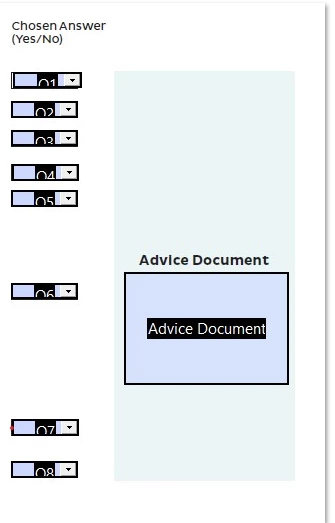
In my pdf form, I have 8 fields that are answers to questions -- each field has a drop of yes or no. I've given yes the value of 1 and no the value of 2.
There is a 9th field (Advice Document) -- it is supposed to display text based on the yes/no replies to the 8 questions. Plus, it should display default text before any questions are answered or if a condition is not met.
Here is a screengrab of the field layout:
This is what I've come up for code:
=======
var q1 = (this.getField("Q1").value);
var q2 = (this.getField("Q2").value);
var q3 = (this.getField("Q3").value);
var q4 = (this.getField("Q4").value);
var q5 = (this.getField("Q5").value);
var q6 = (this.getField("Q6").value);
var q8 = (this.getField("Q8").value);
if ( q1 = 1) event.value = "Text1" ;
else if ( q2 = 1) event.value = "Text2" ;
else if ( q3 = 2) event.value = "Text3" ;
else if ( (q4 = 1) && (q1 = 1)) event.value = "Text4" ;
else if ( q5 = 2) event.value = "Text3";
else if ( q6 = 1) event.value = "Text3" ;
else if ( q8 = 1) event.value = "Text5" ;
else if ( q8 = 2) event.value = "Text2" ;
else event.value = "DefaultText" ;
=========
(note: Q7 isn't referenced in the code because clicking either yes or no should display the default text)
No errors are flagged, but this doesn't work.
As soon as I close the field dialogue, "Text1" appears in the Advice Document field. Selecting yes or no for any other field has no effect.
I'd be very grateful to anyone who can point out what I'm doing wrong! (Many things, I suspect.)
Thank you.
 AdChoices