


Acrobat Freezing on Launch – Possibly Related to AI Assistant Implementation?
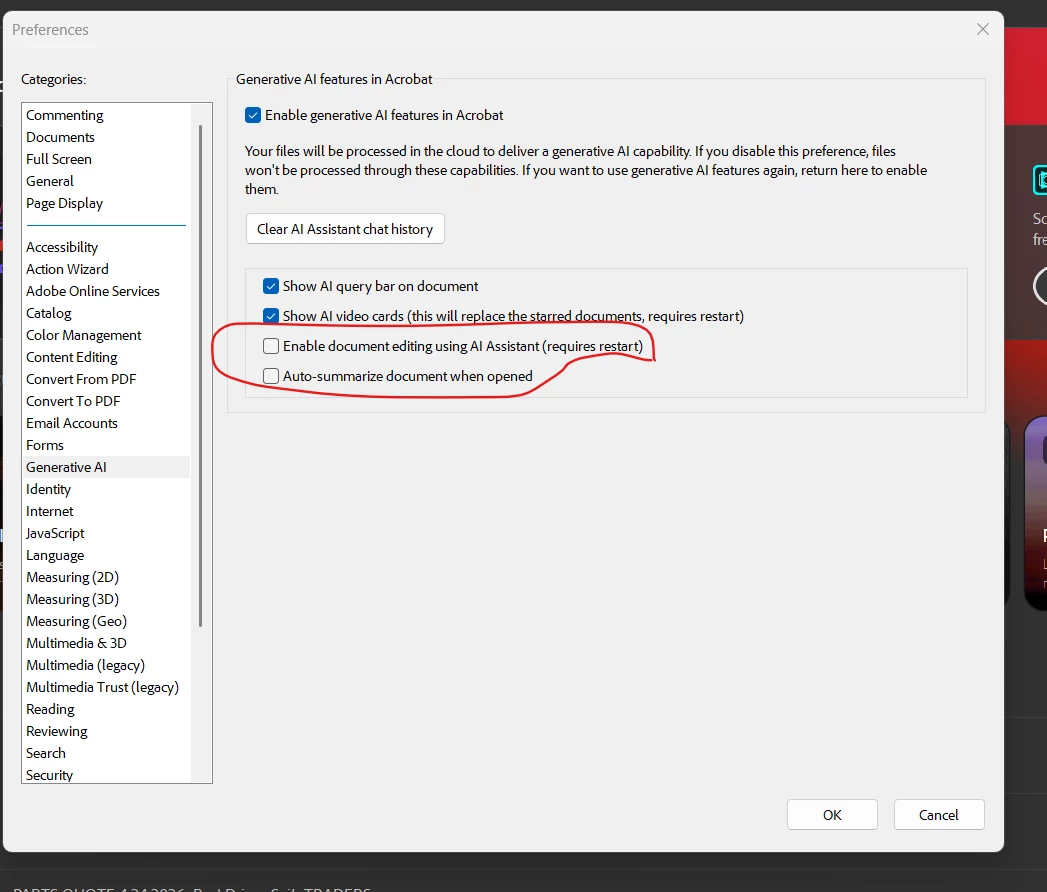
Since the AI Assistant feature was introduced, I've been experiencing a consistent issue with Acrobat on Windows 11 Pro (fully updated, original licensed version). Every time I open the app, it freezes for a while, then unfreezes, freezes again, and eventually becomes usable. However, this pattern repeats every time I close and reopen the application.
My system is not the issue: SSD, dedicated GPU, plenty of RAM and storage. All my Adobe apps are up to date, and the problem seems isolated to Acrobat. I strongly suspect the issue began with the AI Assistant integration, as everything was smooth before.
In addition, I have a long-standing question: why do Acrobat updates not appear in the Creative Cloud desktop app like other Adobe apps (e.g., Premiere, Photoshop, Illustrator)? I've always had to update Acrobat manually from within the app itself. Is there a technical reason for this separation?
I'd appreciate any insights, solutions, or explanations from the community or Adobe staff.
Thanks!

 AdChoices