
Answered
Acrobat icon incorrect in windows menu
Hi,
Please solve this long lasting display bug of Adobe Acrobat in Windows menu (and sometimes taskbar), where its icon is not properly displayed (see screenshot below)!
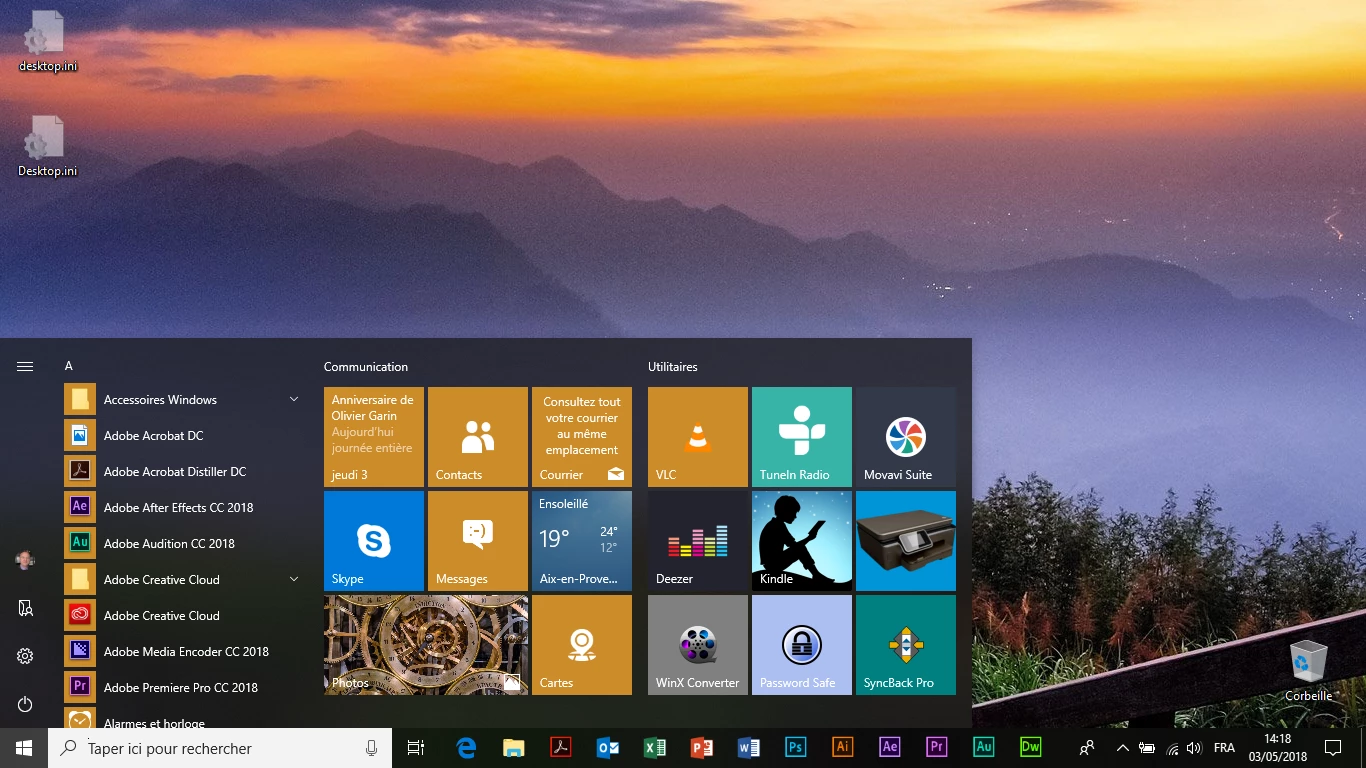
Kind regards

Hi,
Please solve this long lasting display bug of Adobe Acrobat in Windows menu (and sometimes taskbar), where its icon is not properly displayed (see screenshot below)!
Kind regards
Hi Pascal Garin,
Sorry for the delay in response. Are you still facing this issue? If yes, please try following troubleshooting steps:
1) Remove, unpin or delete Adobe Acrobat icon from the Start Menu, the desktop and (if you have it there) from the taskbar.
2) Go to C: > ProgramData > Microsoft > Windows > Start Menu > Programs . "Adobe Acrobat DC" with the wrong icon. The that looks like a shortcut. Delete it!.. Close the window.
3) Go to C: > Program Files (x86) > Adobe > Acrobat DC > Acrobat... and find Acrobat.exe
4) Right click on Acrobat.exe > Send to > Desktop
5) Right click again on Acrobat.exe > Pin to Start Menu... and close the window
6) Right click on Acrobat.exe - shortcut (that you just created on your desktop) > Copy
7) Go back to: C: > ProgramData > Microsoft > Windows > Start Menu > Programs... and Paste the shortcut here (you need administrator privileges for that)
8) Rename this shortcut from "Acrobat.exe - shortcut" to "Adobe Acrobat DC"
9) Close the window and check.
Let us know if you need any help.
Shivam
Already have an account? Login
Enter your E-mail address. We'll send you an e-mail with instructions to reset your password.
 AdChoices