
Question
Acrobat JavaScript help
I'm creating a order form that has multiple variables and conditions and I can't seem to figure out the Custom Calculation Script or if it's even possible.
In the form I have products selling at an individual price and a price per case of the product.
- Each product cost $2.00
- Each Case cost $24.00,
- Each 1/2 Pallet cost $288.00
- Each full Pallet cost $576.00
Depending on how much product is purchased, the buyer will get a discount:
- Spend less than $100 = no discount
- $100-280 = 15% discount
- 1/2 Pallet (12-23 Cases) = 15% discount
- Full Pallet (24 or more Cases) = 25% discount
The image attached is how my form is structured. 9A & 9B will be quantities while 9C & 9D will be calculated prices based on the quantity ordered. The box on the right (9E) will be hidden and will hold the discounted price.
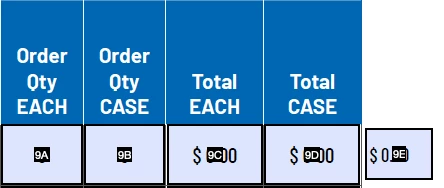
The discounted price will then be added with all the other line items and displayed in a TOTAL Discount field.
I'd appreciate any help. Thank you for your time.
 AdChoices