Inspiring
June 14, 2023
Answered

Acrobat just updated. How do I reset the user interface to the traditional layout

  • June 14, 2023
  • 16 replies
  • 32325 views

The new user interface on Acrobat is a jumbled mess to anyone that has been using Acrobat for several years.


Is it possible to revert back to the traditional user interface?  I'm in the middle of several projects and I'd rather not waste time trying to learn a new user interface right now.

Correct answer Bevi Chagnon - PubCom.com

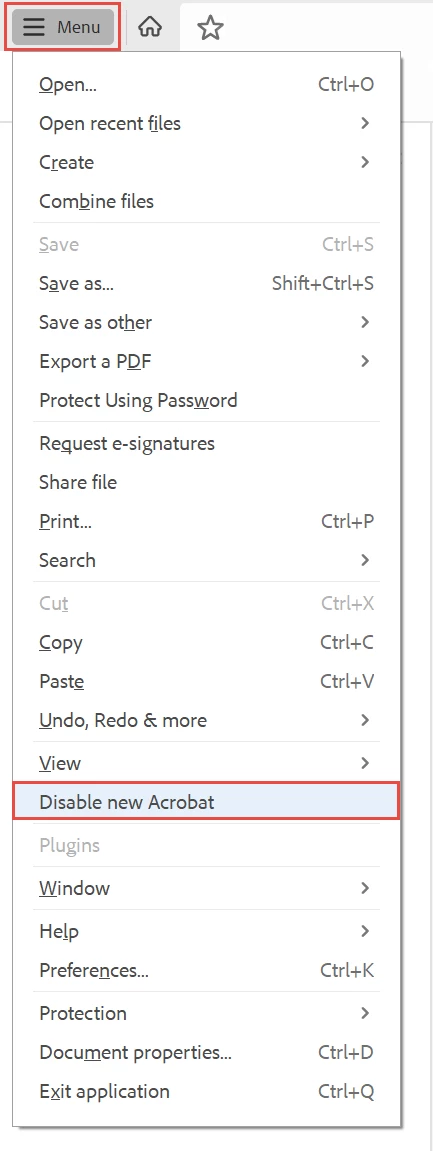
Yes, for now you can revert to the "traditional" user interface.


You can revert to the classic GUI interface by following the instructions here for both Mac and Windows users:

https://community.adobe.com/t5/acrobat-discussions/acrobat-2023-how-to-revert-to-classic-gui-user-interface/td-p/14052807 


And the above sentence tells a lot about the new interface:

  • A hamburger menu — although commonly used on mobile, are not necessary on desktop applications where the screen has enough "real estate" to provide a full menu. So users are not looking for or expecting a hamburger menu.
  • A hamburger menu that didn't have a label, so people looking for the 35-years-plus "File" menu were lost. And users certainly weren't looking for 3 horizontal bars to reach the controls for saving, printing, and exiting.
  • A menu system that is made up of little grey icons without labels. What do they mean? What do they do? WTHK!  And they can't be organized into a menu/panel of just the tools needed.
16 replies

Participant
August 1, 2023

Thanks for posting this.  The New Interface was driving me nuts... 


c.pfaffenbichler
Community Expert
Community Expert
July 21, 2023

»Create custom tool« gets me this: 


So the »new Acrobat experience« has apparently been released with a degraded feature set. 

I am afraid that will not promote a smooth transition. 

Participant
July 20, 2023

I totally agree with you. The UI is a big mess and very annoying. They should ask you at launch "do you want the new interface?" instead or having the reaction what is going on? Beside the vertical menu bar in Comment is time consuming to use, is much better when all the tools are on the top horizontal menu with text NOT icons!

Participant
July 3, 2023

Please keep this ability. The new lay out must have the ability to put thing where we want to the left or to the right. You just moved everything to the RIGHT that was on the LEFT, and everything from the TOP to the BOTTOM RIGHT with some flaoting sliders, and worst of all... You put the quick access flaoting! Floating in front of our work, unable to be moved or rendered invisible. We didnt pay you to obstruct our view with floating toobars that cannot move and hover above the work or readable space.


The layout is trash, garbage, crap. It just is.


I do not want litterally anything perma-floating over my work/read area at the least.


Thank you very much for including the revert! It save my sanity for now. I mean it.


REVERT = YES

New Layout = FAIL

c.pfaffenbichler
Community Expert
Community Expert
July 21, 2023
quote

The layout is trash, garbage, crap. It just is.

I do not appreciate the choice of words, but the new interface does indeed seem, to put it mildly, problematic. 

simple_scribe
Participating Frequently
October 30, 2023

Thanks, @c.pfaffenbichler. @unknowntyper helpfully diagnoses the inconveniences of the new layout, even though the language used is hyperbolic.

Participant
June 22, 2023

Good discussion, and great advice from Bevi Chagnon, whose solution worked for me, as well - thank you. Note that it's not just a matter of personal UI preference. In my case, as I work constantly with PDF portfolios, the new UI has a bug that when you open a portfolio generated from e-mail messages via PDFMaker, the new UI does not preview correctly all the fields of each PDF file that corresponds to an e-mail message.

Bevi Chagnon - PubCom.com
Legend
June 14, 2023

Yes, for now you can revert to the "traditional" user interface.


You can revert to the classic GUI interface by following the instructions here for both Mac and Windows users:

https://community.adobe.com/t5/acrobat-discussions/acrobat-2023-how-to-revert-to-classic-gui-user-interface/td-p/14052807 


And the above sentence tells a lot about the new interface:

  • A hamburger menu — although commonly used on mobile, are not necessary on desktop applications where the screen has enough "real estate" to provide a full menu. So users are not looking for or expecting a hamburger menu.
  • A hamburger menu that didn't have a label, so people looking for the 35-years-plus "File" menu were lost. And users certainly weren't looking for 3 horizontal bars to reach the controls for saving, printing, and exiting.
  • A menu system that is made up of little grey icons without labels. What do they mean? What do they do? WTHK!  And they can't be organized into a menu/panel of just the tools needed.

|    Bevi Chagnon   |  Designer, Trainer, & Technologist for Accessible Documents ||    PubCom |    Classes & Books for Accessible InDesign, PDFs & MS Office |
bobw111Author
Inspiring
June 14, 2023
PERFECT!!! THANKS!