
Participant
June 2, 2018
Question

Acrobat - large images in fragments

  • June 2, 2018
  • 1 reply
  • 1660 views

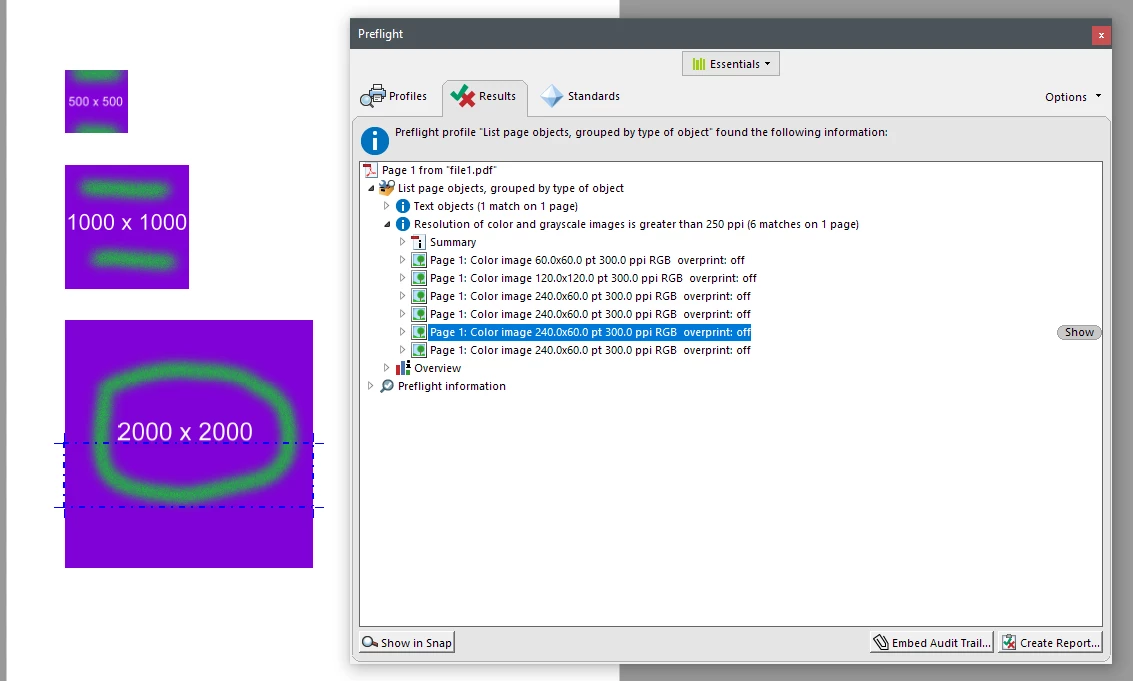
Upon printing a pdf-file with Acrobat Pro DC, some large images get segmented / fragmented / split into pieces. All the pictures are done with the same software, they are just different size.

The pdf-file was printed from Word with Acrobat Pro DC, using High Quality -settings. What is rationale for this and how it can be prevented? Prefilght shows that the lowest image is in four parts.
This topic has been closed for replies.

1 reply

AnandSri
Legend
June 5, 2018

Hello Mikkol,

We apologize for the inconvenience caused, as per the description above, while printing a pdf-file with Acrobat Pro DC, some large images get segmented/ fragmented/split into pieces, Is that correct?

What is the dot version of Acrobat installed on the machine? To identify, please refer to Identify the product and its version for Acrobat and Reader DC

Run the Preflight Fix for page contents and see if this brings any difference in the resultant PDF.

Under the Preferences of ACROBAT Tab in Word>Advanced Settings>Images>Turn off the Downsampling and see if this makes any changes to the large images in the PDF.

Have you tried with other PDF files or is it specific to one PDF? Is it possible to share the PDF file and the source document so that we can test it at our end? To share the file, please use Adobe Send feature, upload the file, share the link to files via private message only, How Do I Send Private Message

Is it a Mac or Windows machine and what is the version of the operating system installed?

You can also refer to the Adobe article Printing complex PDF document using Adobe Acrobat and see if the suggestion helps.

Let us know how it goes and share your findings.

Regards,

Anand Sri.