Suddenly getting Acrobat using a crazy amount of memory on many users at work. Have tried clearing the prefs and the page cache. Even installed acrobat again on some machines but has come back 24 hours later. Any reccomendations for a fix would be great
I'm getting a memory leak with the latest Adobe Acrobat as well, though many months later (first experienced/noticed in September). Whenever I open a PDF in Adobe Acrobat then close it, Adobe stays open in the background and slowly starts taking more and more memory, slowing down my system in a matter of minutes. It's most noticeable in my inputs like mouse and keyboard, which lag a lot, and when I go and kill the program in Task Manager (Windows 11) it freezes my computer. But not actually. Just my inputs. I got a notification from a different app and my task bar popped up with perfectly smooth animation while my mouse was still frozen. The only fix for me so far is to hard shut down and reboot my PC, which since Adobe isn't a startup app on my computer solves it until I need it again.
I’ve just started getting this issue post Tahoe 26.5.2 update install. Hoping Adobe fix this real quick because I for one do not want to use the new Acrobat which IMO is not intuitive and makes all of my regular tasks take so much longer.
We’re having the same issue on multiple macs across our studio. Changing to the ‘new acrobat’ theme seemingly fixes it, but that’s impossible to use with any efficiency.
Another workaround if you don’t need the Pro features (preflight tools, etc), is to use Adobe Reader which doesn’t seem to have the same issue from my testing. But obviously lacks a lot of features that you’re already paying for and isn’t a long-term solution...
Are you using the ‘old’ or ‘new’ acrobat theme? I’ve had the same issue with the old acrobat theme, but it now seems fine running with the ‘new acrobat’ theme. Might be worth a try. (View > enable new acrobat)
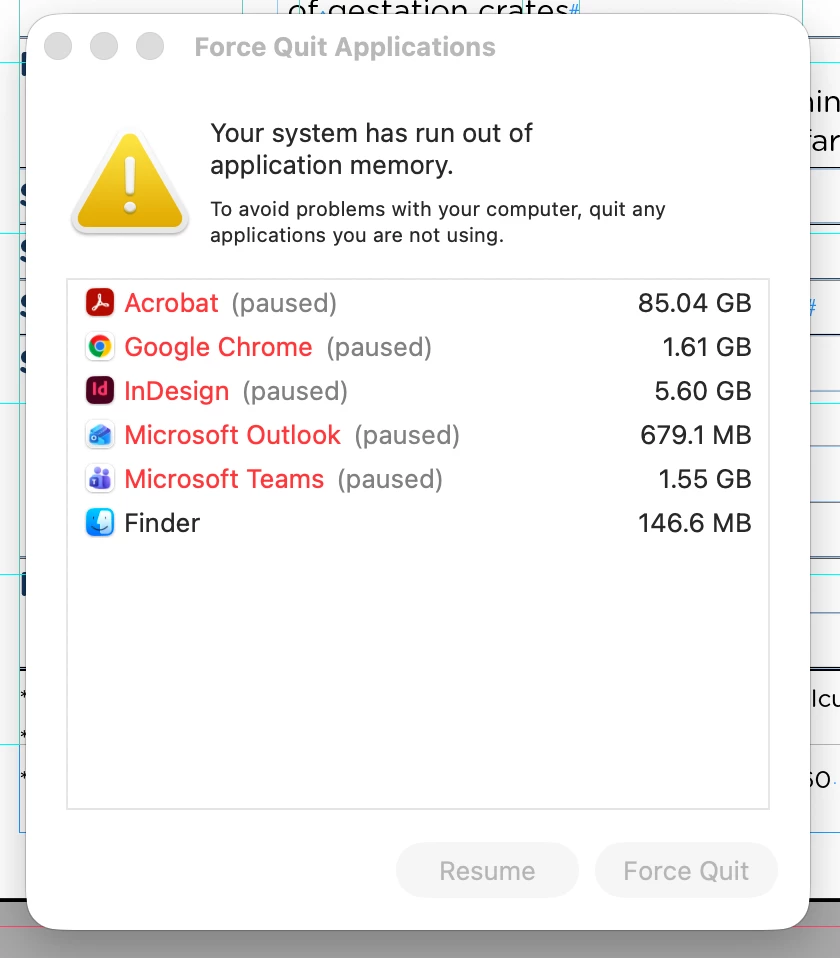
I’m also having the same issue, on several macs. Memory explodes up to 120gb, force quitting seems to be the only solution at this stage. It may remain stable for a short while, then memory starts increasing exponentially very quickly.
One of my users is having this same memory leak starting with update 26.001.21367.
They are on a MacBook Pro (16-inch, M1 Pro, 2021) with 32GB of RAM.
The day this update came out they started running into this exact issue. The only work around currently is to constantly quit it as soon as they are done using it. But they use it all the time, so this means quitting it every ten minutes.
When the memory leak starts, it seems to jump up to using all available physical memory, and then moves into using all available scratch disk space. This results in having to reboot the machine in most cases.
Friday’s update did not have any impact on this issue as it still occurs.
Also, the documents being opened are all fairly small. Less than a megabyte.



 AdChoices