


Inspiring
July 6, 2026
Question

Acrobat on screen rendering incorrect

  • July 6, 2026
  • 3 replies
  • 266 views

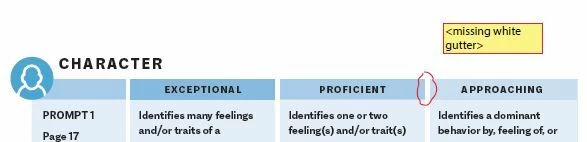
PDFs we’re exporting from InDesign have tables with various colors and shades.

More than one person at our client are seeing and marking the white space between only these two colors as missing.

They are on Macs. On the 4 PCs I’ve checked in my operation they all show as you see the first picture below. I asked them to zoom in to check it and was specific about not just using the iOS zoom and using Acrobat’s zoom, and it is still missing. The 2nd picture is below is a screen shot sent by them at 300% zoom! I am completely stumped.

Does anyone know what might be causing this?

Thanks for any help,
Ken


    3 replies

    Sasha003
    Participating Frequently
    July 7, 2026

    It might also be worth asking one of the affected Mac users to temporarily disable Enhance Thin Lines and GPU acceleration in Acrobat's display settings to see if the gap disappears. I've seen rendering artifacts that only showed up on certain hardware, even though the PDF itself was perfectly fine. That would at least help confirm whether it's a display issue rather than an export problem.

    KenWKAuthor
    Inspiring
    July 7, 2026

    Turning off the Enhance Thin Lines makes a small change on my computer, but still no where near completely disappearing like they’re seeing. I don’t have any GPU settings, likely because I’m working virtually.

    I’ve emailed to see if they’re willing to try these suggestions. Will post back if I hear back.

    Thanks

    Brad @ Roaring Mouse
    Community Expert
    Community Expert
    July 7, 2026

    Is the table made IN InDesign or imported from elsewhere (e.g Illustrator). 

    If it the table was done in Illustrator, I would suspect that the white “gap” may have been erroneously assigned overprint. If they are viewing this in Acrobat > Print Production > Output Preview, see if there’s a difference if Simulate Overprint is toggled on/off.

    KenWKAuthor
    Inspiring
    July 7, 2026

    They are set in InDesign and the cell rules creating the “gutter” are definitely turned on.

    Thanks

    Dave Creamer of IDEAS
    Community Expert
    Community Expert
    July 6, 2026

    Are the Mac users using the default Preview or Acrobat Reader/Pro?

    David Creamer: Community Expert (ACI and ACE 1995-2023)
    KenWKAuthor
    Inspiring
    July 6, 2026

    Good question! I’d forgotten about the preview. I’m nearly sure it’s Acrobat because they’re using Acrobat markup. But I’ll find out.

    KenWKAuthor
    Inspiring
    July 6, 2026

    Wait, my bad. They’re in Acrobat because I specified using Command, Plus or View > Marquee Zoom when zooming and one of them tried both with no joy.

