Participating Frequently
August 30, 2025
Answered

Acrobat opening all inserted images as PDFs - and the images are terrible

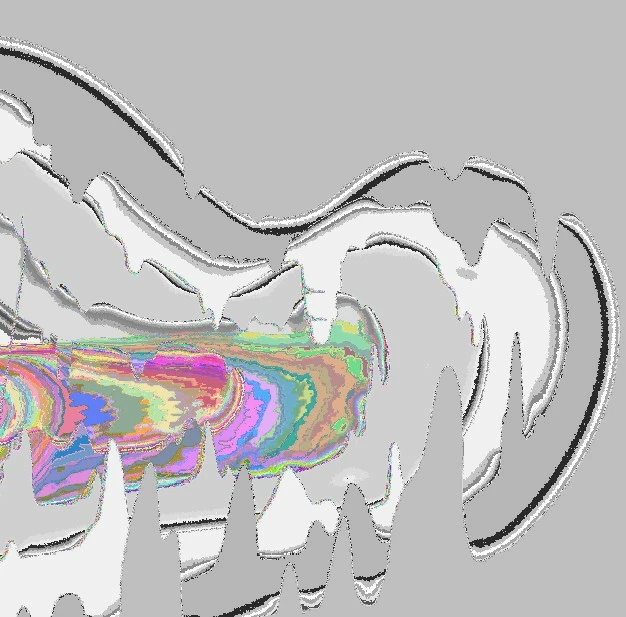
What setting do I need to go to in order to make Acrobat STOP automatically converting all inserted jpg,jpeg, png files to PDFs? The conversion ruins the image - changing all the colors to gray/neon - like a negative image of the original, but with lots of pixelation and lines so you can no longer tell what the original image was. (See image below.  I just want Acrobat to open inserted jpegs, etc. as IMAGE files, not PDFs.) I have already tried ctrl K and cannot find an appropriate setting to change.  I already have Photos as the default app to open these types of files on my windows pc.
JR Boulay
JR BoulayCorrect answer
Community Expert
September 1, 2025

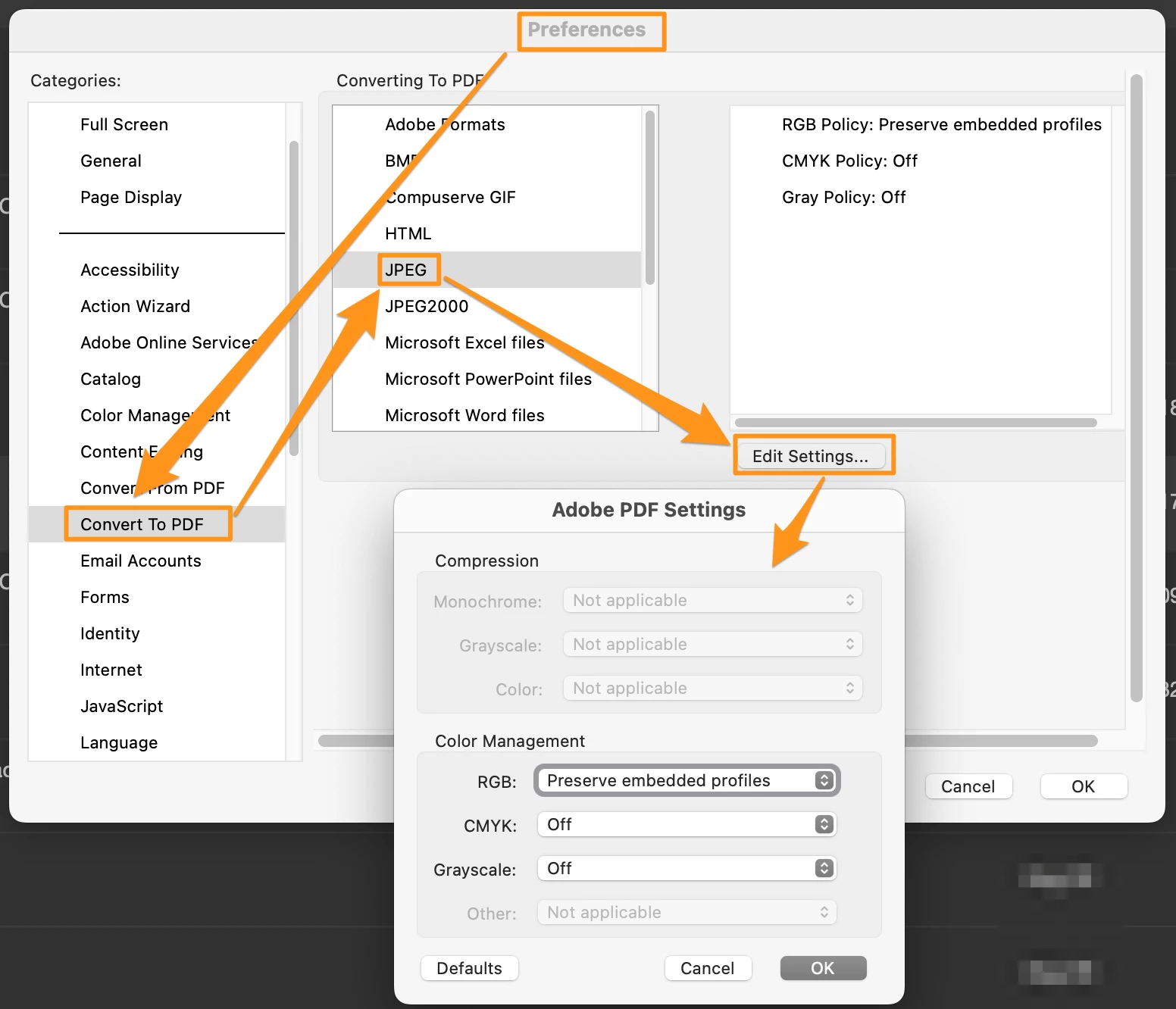
You should check the settings in your Acrobat Preferences : Convert to PDF


Acrobate du PDF, InDesigner et Photoshopographe

8 replies

JR Boulay
Community Expert
JR BoulayCommunity ExpertCorrect answer
Community Expert
September 1, 2025

You should check the settings in your Acrobat Preferences : Convert to PDF


Translate
Acrobate du PDF, InDesigner et Photoshopographe
Participating Frequently
September 1, 2025

Thank you so much! I will adjust those because my settings don't match what you've shown me, so I will update them to the above. 

Translate
Participant
September 1, 2025
quote

What setting do I need to go to in order to make Acrobat STOP automatically converting all inserted jpg,jpeg, png files to PDFs? The conversion ruins the image - changing all the colors to gray/neon - like a negative image of the original, but with lots of pixelation and lines so you can no longer tell what the original image was. (See image below.  I just want Acrobat to open inserted jpegs, etc. as IMAGE files, not PDFs.) I have already tried ctrl K and cannot find an appropriate setting to change.  I already have Photos as the default app to open these types of files on my windows pc. AES Success


By @Rachael27089964dqc6

Acrobat is not designed as an image viewer; it automatically converts image files to a new, often-corrupted PDF document. The key to stopping this is to manage your PC's file associations, not a setting within Acrobat itself. You need to go to **Windows Settings > Apps > Default apps** and manually ensure that file types like `.jpg` and `.png` are set to open with the **Photos** app or another dedicated image viewer, preventing Acrobat from ever being the default program for these files.

Translate
Participating Frequently
September 1, 2025

I already do have photos set up as the default app to view jpg, png, etc. I think it is a corruption issue, because I stumbled onto the fact that when I open a brand new PDF doc in Acrobat and insert an image, it works fine - but the pre-existing PDF docs that I try to insert images into all have this issue. So I've just been re-creating the corrupted PDFs.

Translate
Bernd Alheit
Community Expert
Community Expert
August 30, 2025

Where have you inserted the files?

Translate
Participating Frequently
August 30, 2025

In adobe Acrobat - screenshots attached. When I select "Add Image," then choose a jpg/jpeg and select "Open," it pulls the file over but a pop up appears stating "Opening Image File as PDF" and I am unable to stop it.  Then the image appears as shown below in acrobat.


Translate
Participating Frequently
August 30, 2025

Original image (and what I WANT to show up in Acrobat) looks like this: (but isn't ONLY this image - it's happening all jpegs and I have no idea why.) 


Translate