
mglush
Community Expert
Community Expert
January 13, 2024
Question

Acrobat Pasteboard color

  • January 13, 2024
  • 3 replies
  • 1104 views

Hi All!

In Acribat Pro, The System Theme is the same background color as the Light Gray Theme. Is that what it is supposed to be? I am finding that it is hard on my eyes with the White on White and the Dark Gray is too much contrast. Can we bring back the Medium Gray that we had in previous versions? It is much easier to look at for long periods of time.
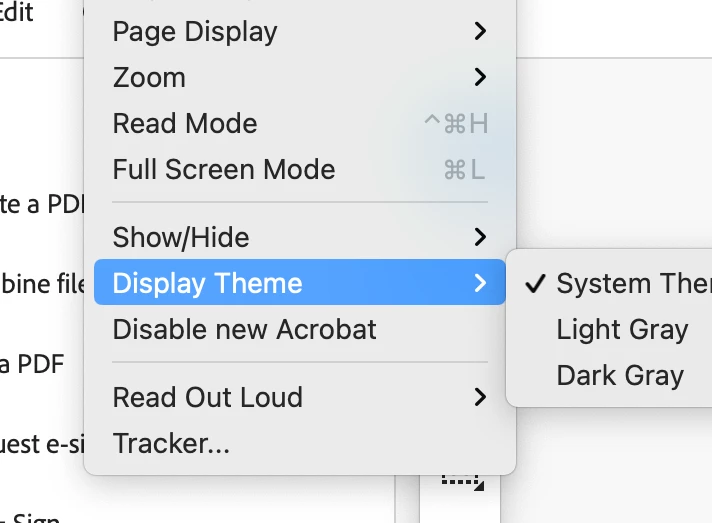


Is there a legacy setting? or anything else I can change it too? I just want to say again, please bring back the Medium Gray.

Thanks,

Michelle

This topic has been closed for replies.

3 replies

Abambo
Community Expert
Community Expert
January 14, 2024

@mglush,

You should go to Uservoice and get your voice heard. https://acrobat.uservoice.com

ABAMBO | Hard- and Software Engineer | Photographer
mglush
Community Expert
mglushCommunity ExpertAuthor
Community Expert
January 14, 2024

Thanks! Good idea.

Participating Frequently
January 13, 2024

Open Adobe Acrobat Pro DC and go to "Edit" > "Preferences" (Windows) or "Acrobat" > "Preferences" (Mac) and Look for a "Customization" or "Interface" section within Preferences. Some versions might allow you to customize the interface colors.

mglush
Community Expert
mglushCommunity ExpertAuthor
Community Expert
January 14, 2024

Thank you for your help!

Participating Frequently
January 13, 2024

If you are using the System Theme, check your operating system's settings for appearance or themes. Adjusting the system-wide theme might affect how Adobe Acrobat appears.

mglush
Community Expert
mglushCommunity ExpertAuthor
Community Expert
January 14, 2024

Thanks for the tip. The Light option is selected and when I change it to Dark, then everything goes very dark and it doesn't help anymore than the option inside of Acrobat. But thank you so much for the suggestion.

Mcihelle